
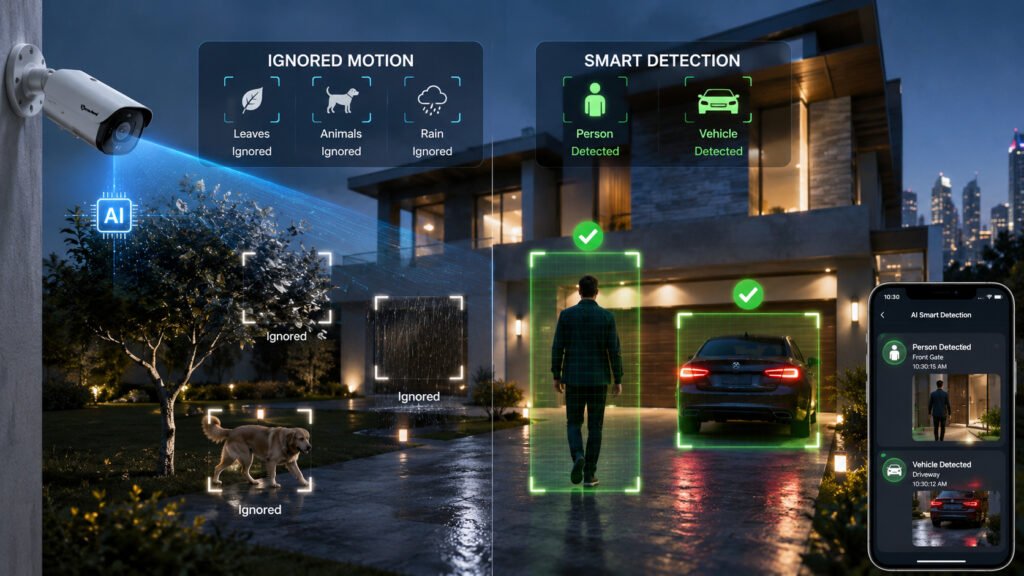
Security cameras used to do one thing: record whatever moved in front of them. That was fine until you actually had to review the footage: hours of a tree swaying in the wind, a cat crossing a driveway, or shadows shifting as clouds passed overhead, all filed under the same “motion detected” alert as an actual intruder.
AI smart detection changes that. Instead of reacting to any pixel change, modern cameras use artificial intelligence to work out what is moving: a person, a vehicle, or something that doesn’t need your attention at all. That distinction is the difference between a camera that’s genuinely useful and one that just generates noise.
This guide covers what AI smart detection actually means, how person and vehicle detection work under the hood, why they cut down on irrelevant alerts, and how to figure out which detection type, or combination, actually fits your property. If you’re still deciding between camera formats altogether,
What Is AI Smart Detection in Security Cameras?
AI-powered smart detection is a camera feature that uses machine learning models to analyze video in real time and classify what’s causing movement, rather than simply flagging that movement occurred. The camera isn’t just comparing pixel differences between frames — it’s running object recognition to determine whether what it’s seeing is a person, a vehicle, an animal, or background noise like rain or foliage.
Under the hood, this works because the camera (or a connected NVR/processor) runs a trained detection model against each frame or video segment. That model has learned the visual patterns that distinguish a human silhouette from a car, a bicycle from a delivery van, or a moving branch from either. When the model recognizes a match with enough confidence, it triggers a classified alert instead of a generic one.
The core difference between traditional motion detection and AI detection comes down to what triggers the alert. Traditional motion detection responds to any significant change between video frames, brightness shifts, movement of any kind, even compression artifacts in low light. AI detection adds a classification layer on top of that: movement alone isn’t enough to trigger a notification unless the system also confirms it matches the object type you’ve configured it to care about.
How Does AI Smart Detection Work?
AI smart detection isn’t a single feature; it’s a pipeline of several steps happening in sequence, usually within a fraction of a second per frame.
Camera Sensors and Video Capture
It starts with the image sensor capturing continuous video, the same as any CCTV or IP camera. Resolution, frame rate, and low-light sensitivity all affect how much usable detail is available for the next stage; a sensor that struggles in low light gives the AI model less to work with, which is part of why detection accuracy tends to drop at night on lower-end cameras.
AI-Based Object Detection
The captured frames are analyzed by an object detection model, either processed on the camera itself (edge processing) or sent to a connected NVR or cloud service for analysis. This model scans each frame for shapes and patterns that match objects it’s been trained to recognize, drawing a bounding box around anything that looks like a candidate object.
Person, Vehicle, and Motion Classification
Once an object is detected, it gets classified. The system decides whether the shape in that bounding box is more likely a person, a vehicle, or simply unclassified motion (an animal, a swaying branch, a shadow). This classification step is what separates AI smart detection from basic motion sensing; it’s not enough for something to move; it has to be recognized as belonging to a specific category.
Detection Zones and Rules
Most AI camera systems let you draw specific zones within the frame- a driveway, a doorway, a boundary line- and set rules for each one. You might want person detection active at a front gate but vehicle detection active in a parking area, all within the same camera’s field of view. Rules can also include line-crossing detection, direction of travel, or time-of-day restrictions. Cameras with an adjustable field of view, see our breakdown of fixed vs. varifocal lens cameras, make these zones easier to fine-tune after installation, since the coverage area itself can be adjusted rather than just the detection rule applied to it.
Alerts and Notifications
Once an object is classified and matches an active rule, the system generates an alert, a push notification, an email, an NVR event log entry, or all three. Because the alert already carries a classification (“person detected at the front gate” rather than just “motion detected”), you can prioritize what to check first instead of reviewing every single triggered clip.
Person Detection in Security Cameras
What Is AI Person Detection?
AI person detection is a specific classification mode where the camera’s detection model is trained to recognize human shapes and movement patterns, and only triggers alerts when it identifies a person within the frame or a defined detection zone.
How Person Detection Works
The detection model looks for features consistent with a human silhouette — proportions, movement patterns, posture — across a sequence of frames. Because people move differently from vehicles, animals, or environmental elements, this pattern recognition allows the system to filter out non-human movement with reasonable reliability, even when the person is partially obscured or moving at an angle.
Person Detection vs Basic Motion Detection
Basic motion detection flags any movement without knowing what caused it. Person detection specifically confirms that a human is present before triggering an alert, which means a stray cat, a moving curtain, or headlights sweeping across a wall won’t generate a notification the way they would on a standard motion-only system.
Where Person Detection Is Useful
- Entrances — front doors and lobby areas where you want to know specifically when someone approaches, not when a delivery truck passes on the street behind it.
- Driveways — distinguishing a visitor on foot from a passing vehicle or pet.
- Perimeters — boundary walls and fence lines where any human presence outside expected hours is worth flagging.
- Offices — after-hours monitoring where the priority is knowing if a person entered the building, not tracking every automated system or moving object inside.
- Warehouses — large indoor or yard spaces where forklifts and equipment move constantly, but human presence in a restricted zone is the actual concern.
Secuview’s 12MP indoor PoE camera with auto-tracking is a common fit for these indoor use cases, combining person-focused detection with tracking so a subject stays centered in frame as they move through a monitored area.
Vehicle Detection in Security Cameras
What Is AI Vehicle Detection?
AI vehicle detection is a classification mode that identifies cars, vans, motorcycles, and other vehicles within the camera’s field of view, triggering alerts specifically when vehicle-shaped movement is detected rather than any general activity.
How AI Identifies Vehicles
Vehicle detection models are trained on the visual characteristics that separate vehicles from people or animals — size, shape, speed of movement, and typically the geometry of a chassis moving along a relatively consistent path (a driveway, a road, a parking lane). This lets the system recognize a car pulling into a driveway as a distinct event from a person walking the same path.
Vehicle Detection vs General Motion Detection
General motion detection can’t tell the difference between a vehicle entering a driveway and a bird flying through the frame — both register as “movement.” Vehicle detection filters specifically for vehicle-shaped objects, which matters most in spaces where non-vehicle movement (trees, pedestrians, animals) would otherwise generate a high volume of irrelevant alerts.
Where Vehicle Detection Is Useful
- Driveways — flagging arrivals and departures without alerts for every pedestrian or animal that crosses the same area.
- Parking areas — monitoring for unauthorized vehicles or confirming activity in large lots where foot traffic isn’t the primary concern.
- Gates — triggering automated logging or access review specifically when a vehicle approaches, rather than any nearby movement.
- Loading zones — tracking delivery vehicle activity separately from general warehouse foot traffic.
- Commercial properties — larger sites where vehicle movement patterns (unexpected vehicles, after-hours activity) are a distinct security signal from general activity on the property.
For gates, loading bays, and vehicle entrances specifically, an adjustable field of view often matters as much as the detection itself — the 8MP varifocal lens outdoor IP camera lets installers tune the coverage angle to the exact width of a driveway or entrance rather than working around a fixed field of view.
Motion Detection vs AI Smart Detection
| Feature | Traditional Motion Detection | AI Smart Detection |
|---|---|---|
| Detects movement | Yes | Yes |
| Identifies people | Usually no | Yes |
| Identifies vehicles | Usually no | Yes |
| Helps reduce irrelevant alerts | Limited | Better targeted detection |
| Detection classification | Basic movement | Object-based classification |
| Detection rules | Basic | More configurable |
Why AI Detection Can Reduce False Alerts
Most of the notifications a basic motion-detection camera sends aren’t actually about security events — they’re about everything else that moves in frame. AI detection narrows that down by filtering out the categories that rarely matter for security purposes and prioritizing the ones that usually do:
- Movement from people is classified and can be isolated from other activity, so a person entering a restricted zone stands out instead of getting buried among unrelated notifications.
- Vehicles are recognized as a distinct category, letting you separate vehicle-related alerts from foot traffic or environmental movement entirely.
- Environmental movement — wind-blown branches, shifting shadows, insects near the lens, rain — is one of the biggest sources of false alerts on basic motion systems, and AI classification filters most of it out by simply not matching it to a person or vehicle profile.
- More targeted detection rules let you combine classification with zones and schedules, so a system only alerts on the specific combination of object type, location, and time that actually matters for that property.
Person vs Vehicle vs Motion Detection: Which Do You Need?
Choose Person Detection When
- You mainly monitor people entering restricted areas, such as a private entrance, staff-only zone, or perimeter fence line.
- You need alerts specifically around doors, gates, or property boundaries where human presence — not vehicle or general activity — is the primary concern.
Choose Vehicle Detection When
- Vehicle movement is the main concern, such as monitoring who enters or exits a property by car.
- You monitor driveways, parking areas, or loading zones where vehicle activity is the most security-relevant signal.
Choose Motion Detection When
- General movement is sufficient for your needs — for example, a low-priority area where any activity at all is worth a basic log entry.
- You need broader activity monitoring without the added configuration of object-specific rules.
Use Multiple Detection Types When
- A property requires both people and vehicle monitoring across different areas — a home with both a front door and a driveway, for instance.
- Different zones have different security requirements, such as person detection at entrances combined with vehicle detection at a gate, all managed from the same camera system.
Where AI Smart Detection Is Useful
Homes and Villas
Person detection at entrances and vehicle detection at driveways or gates together cover the two most common residential concerns — knowing who approaches the property on foot and tracking vehicle arrivals — without generating alerts for every gardener, delivery, or passing animal.
Offices and Retail Stores
Smart detection helps distinguish after-hours human presence from routine building activity like HVAC-triggered motion sensors or automated equipment, making after-hours alerts far more meaningful.
Warehouses and Commercial Properties
Large sites with constant equipment movement benefit from being able to filter specifically for human or vehicle presence in restricted zones, rather than treating every forklift pass or loading activity as a security event.
Outdoor Entrances, Gates, and Driveways
These are typically the highest-traffic points for both classification types, making them the areas where AI detection delivers the most noticeable reduction in irrelevant notifications compared to basic motion sensing.
Property Perimeters
Boundary lines and fences benefit most from person detection specifically, since unexpected vehicle activity is less likely along a perimeter than unexpected human presence.
Key Benefits of AI Smart Detection
More Relevant Security Alerts
Notifications correspond to actual classified events, a person or vehicle, rather than any movement at all, so each alert carries more useful information from the start.
Reduced Unnecessary Notifications
Filtering out environmental movement and irrelevant activity means fewer notifications overall, which makes it more likely that the ones you do receive get checked promptly rather than ignored after repeated false alarms.
Faster Incident Review
Classified events make it easier to search recorded footage, jumping directly to clips tagged “person detected” or “vehicle detected” instead of scrubbing through every motion-triggered recording from a given day.
Better Monitoring of People and Vehicles
Separating these two categories means you can apply different rules, schedules, and priorities to each, rather than treating all activity on a property as equally significant.
More Efficient Video Surveillance
Less time spent reviewing irrelevant footage and fewer false alerts overall means the system requires less manual oversight to remain useful day to day.
What to Look for in an AI Smart Detection Camera
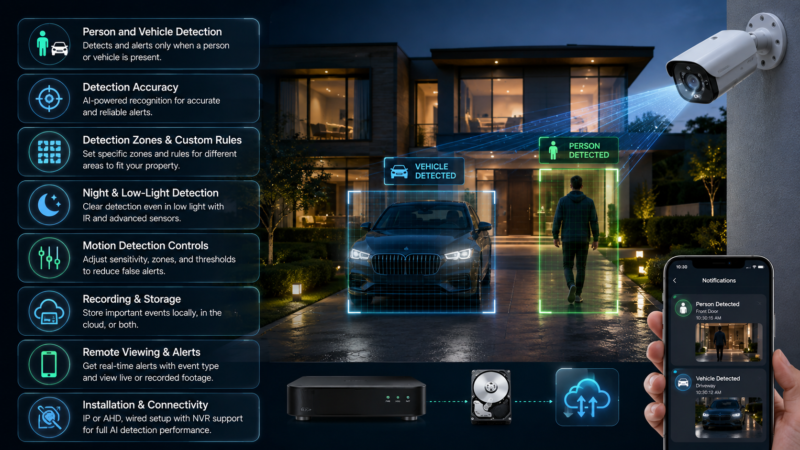
Key features to consider when choosing an AI smart detection security camera.
Person and Vehicle Detection
Confirm the camera actually supports both classification types (not just generic “smart” motion detection), since some lower-end models market AI features without true object classification.
Detection Accuracy
Accuracy varies significantly between models and lighting conditions; look for cameras with dedicated AI processing rather than software-only motion filtering layered on top of a standard sensor.
Detection Zones and Custom Rules
The ability to draw specific zones and apply different detection rules to each is what makes AI detection genuinely configurable to a property’s actual layout, rather than a blanket setting across the whole frame.
Night and Low-Light Detection
Detection accuracy typically drops in low light unless the camera has strong infrared performance or a low-light-optimized sensor, this is worth checking specifically if outdoor nighttime coverage matters.
Motion Detection Controls
Look for the ability to fine-tune sensitivity, combine AI classification with motion zones, and adjust detection thresholds so the system matches your specific environment rather than a generic factory default.
Recording and Storage
Check whether classified events trigger local NVR recording, cloud storage, or both, and confirm the storage method fits how long you need footage retained.
Remote Viewing and Alerts
Confirm the system supports mobile notifications and remote video access, ideally with the classification type included directly in the alert itself.
Camera Installation and Connectivity
Consider whether the camera is IP or AHD, wired or requires network infrastructure, and whether it integrates with an NVR that supports the detection features you’re relying on — the camera’s AI capability is only as useful as the recording system processing its output. If you’re weighing IP against AHD or wireless options first, our CCTV camera types comparison breaks down which format suits which installation. You can also browse Secuview’s full CCTV camera range to compare AI-enabled models side by side.
AI Smart Detection for Security Cameras in Qatar
Smart Detection for Homes and Villas
Villa properties in Qatar often combine a gated entrance, a driveway, and boundary walls in a single layout, exactly the kind of setup where combining person detection at entry points with vehicle detection at the gate reduces false alerts from passing traffic or neighborhood activity.
Person Detection for Entrances and Perimeters
For standalone homes and compound units, person detection along perimeter walls and at main entrances is typically the most useful classification, since unauthorized vehicle access is less common than unexpected foot traffic near a boundary.
Vehicle Detection for Driveways and Parking Areas
Properties with private driveways, compound parking, or gated vehicle access benefit from vehicle-specific detection to log and alert on arrivals without the noise generated by pedestrians, staff, or delivery activity nearby.
AI Detection for Offices, Warehouses, and Businesses
Commercial and industrial properties across Doha and other areas typically need a combination of both detection types — person detection for restricted indoor or after-hours zones, and vehicle detection for loading areas, staff parking, and site entrances.
Outdoor Detection in Qatar’s Environmental Conditions
Qatar’s climate — high heat, dust, and occasional heavy rain — can affect camera performance generally, so outdoor AI detection cameras used here benefit from strong weatherproof ratings and IR performance in addition to accurate classification, since environmental conditions that degrade image quality can also reduce detection reliability. For properties where running network cable isn’t practical, the WiFi outdoor weatherproof security camera covers smart motion alerts without requiring a wired installation.
AI Smart Detection: Which Detection Type Should You Choose?
- Person detection → when people are the primary concern, such as entrances, perimeters, and restricted zones.
- Vehicle detection → when vehicle activity matters most, such as driveways, parking areas, and gates.
- Motion detection → when general movement monitoring is sufficient and object-specific classification isn’t necessary.
- Multiple detection types → when different areas require different monitoring rules, combining person and vehicle detection across a single property or camera system.
Frequently Asked Questions
What is AI smart detection in security cameras?
AI smart detection is a camera feature that uses machine learning to classify what is causing movement in a video frame, such as a person, vehicle, or other activity, rather than simply detecting that movement has occurred.
What is the difference between AI detection and motion detection?
Motion detection triggers when there is a change between video frames, regardless of what caused it. AI detection adds an object-classification step, allowing the camera to trigger alerts when movement matches a recognized object type, such as a person or vehicle.
How does AI person detection work?
The camera’s AI detection model analyzes shapes and movement patterns across video frames to identify characteristics consistent with a human figure. It can then trigger an alert when the moving object is classified as a person.
How does AI vehicle detection work?
AI vehicle detection models are trained to recognize the size, shape, and movement characteristics associated with cars, vans, and other vehicles. This allows the camera to distinguish vehicles from people, animals, and other environmental movement.
Does AI smart detection reduce false alarms?
Yes. AI detection can filter out movement that does not match recognized person or vehicle profiles, such as wind-blown branches, shadows, or small animals. This can significantly reduce irrelevant alerts compared with basic motion detection.
Can security cameras detect both people and vehicles?
Yes. Many AI-enabled security cameras support both person and vehicle detection, often allowing users to configure different detection rules or zones within the camera’s field of view.
Does AI detection work at night?
Yes, AI detection can work at night, although accuracy depends on the camera’s low-light performance and night vision capabilities. Cameras with stronger infrared and low-light performance generally provide more reliable detection after dark.
Can I turn person or vehicle detection on and off?
Most AI-enabled cameras and NVR systems allow person and vehicle detection to be enabled or disabled independently. Many systems also provide controls for detection sensitivity and the zones where each detection type should apply.
Is AI smart detection useful for outdoor security cameras?
Yes. Outdoor cameras can generate many false alerts from environmental movement, so AI classification can be particularly useful for filtering irrelevant activity around entrances, driveways, gates, and property perimeters.
What is the best AI detection for a home security camera?
For most homes, a combination of person detection around entrances and property perimeters and vehicle detection around driveways or gates covers common residential security needs.
What is the best AI detection for a business?
Businesses can benefit from combining person and vehicle detection. Person detection is useful for restricted or after-hours areas, while vehicle detection can be useful for parking areas, loading zones, gates, and site entrances.
Can AI detection work with existing security cameras?
It depends on the camera and recording system. Some AI detection features run directly on the camera, while others require a compatible NVR that can process AI-based classification. Older analog or basic IP cameras without AI support may require hardware or system upgrades to add these capabilities.
Final Thoughts
AI smart detection goes beyond simply detecting movement — it identifies what’s actually causing that movement, which is what makes modern security cameras genuinely more useful than older motion-only systems. Person and vehicle detection can make alerts significantly more relevant by filtering out the environmental and irrelevant activity that used to dominate motion-triggered notifications.
The best detection type ultimately depends on the property, the specific area being monitored, and what the security objective actually is — a driveway and a perimeter wall don’t need the same detection logic. In most real-world setups, a properly configured camera system doesn’t rely on just one detection type; it combines person detection, vehicle detection, and zone-based rules across different parts of a property to match how that property actually gets used.













