
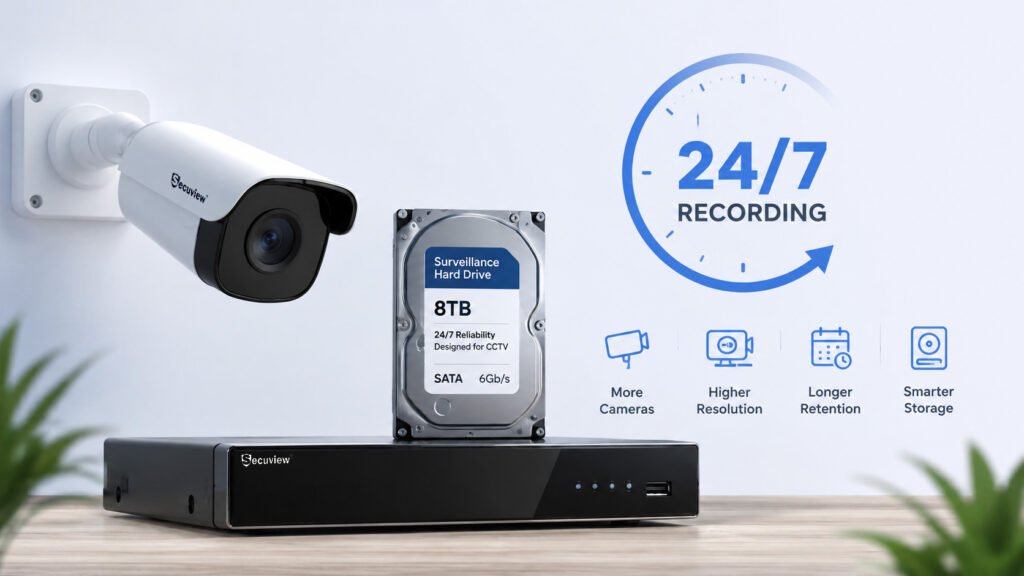
CCTV footage retention is the length of time a recorded video clip stays available on a system before it’s overwritten or deleted. It’s one of the most commonly misunderstood specs in security camera planning, mostly because there’s no single answer that applies across systems. A 4-camera home setup recording only on motion might hold six weeks of footage on the same size hard drive that gives an 8-camera warehouse running 24/7 barely four days.
That gap exists because retention isn’t a fixed property of a camera or an NVR — it’s the output of several variables working together: how many cameras are recording, what resolution and bitrate each one records at, whether recording is continuous or motion-triggered, how much hard drive capacity is installed, and which compression format is in use. Change any one of those, and the number of days your footage stays available changes accordingly.
This guide walks through each of those factors individually, then brings them together into a practical way to plan storage for your own property — whether that’s sizing a hard drive for a new install or figuring out why an existing system is only holding a week of footage when you expected a month.
How Long Does CCTV Footage Usually Last?
Retention periods vary enormously across real installations — anywhere from a few days on a small system with a small drive and continuous recording, to several weeks or months on a system built specifically around long retention with efficient compression and motion-based recording. There isn’t a standard number because CCTV systems aren’t standardized in how they’re configured; two identical cameras on two identical hard drives can produce very different retention windows depending on recording mode alone.
Storage capacity and retention period are related but not the same thing. Storage capacity — the size of the hard drive, measured in TB or GB — is fixed once installed. Retention period is what that fixed capacity translates to in days, and that translation depends entirely on how fast the system is consuming storage per day. A larger drive doesn’t guarantee longer retention if the cameras recording to it are running high-resolution, high-bitrate, continuous streams that fill it just as fast.
Once storage fills up, most NVR and DVR systems don’t stop recording — they overwrite the oldest footage automatically to make room for new footage, operating on a rolling loop. This is the default behavior on the overwhelming majority of consumer and commercial systems, which is why exporting footage you need to keep permanently, before it cycles out, matters more than most users realize.
What Determines How Many Days of CCTV Footage You Can Store?
- Number of cameras — each additional camera adds its own data stream to the total daily storage load.
- Resolution — higher resolution captures more image detail per frame, which means larger file sizes.
- Bitrate — the actual rate of data being written per second, which resolution alone doesn’t fully determine.
- Frame rate — how many frames per second are captured; more frames per second means more data written per second of footage.
- H.264 vs H.265 compression — the compression standard in use significantly affects how much storage the same footage consumes.
- Continuous vs motion-based recording — whether the system records around the clock or only when triggered by activity.
- Hard-drive capacity — the total available storage the system has to work with.
- Recording schedule — whether recording runs 24/7, during set hours, or only during specific windows.
What Affects CCTV Footage Storage Requirements?
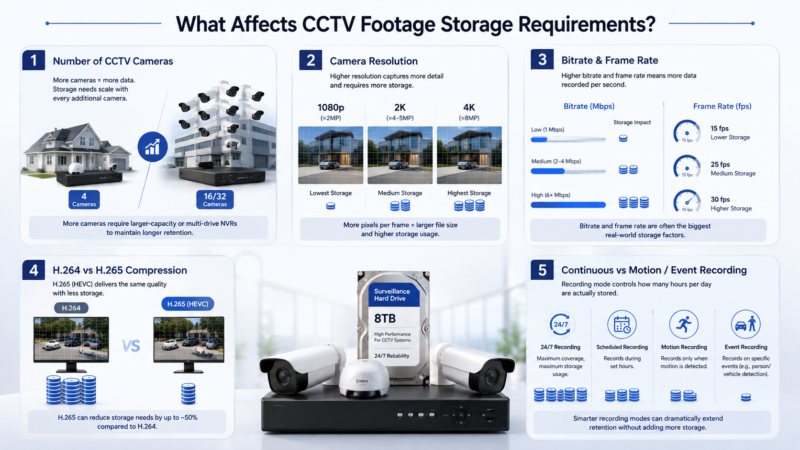
CCTV storage requirements depend on camera count, resolution, recording time, bitrate, and compression.
Number of CCTV Cameras
Every camera added to a system is an independent video stream writing its own data to storage, so total storage consumption scales roughly linearly with camera count when other settings stay constant. A small home system with 4 cameras recording continuously at moderate resolution might consume a relatively modest amount of storage per day. A larger commercial system with 16 or 32 cameras covering a warehouse or multi-building site multiplies that same per-camera load by every additional unit, which is why commercial installations typically pair higher camera counts with larger-capacity or multi-drive NVRs rather than trying to stretch a single consumer-grade drive across the whole system.
Camera Resolution
Resolution determines how much visual detail each frame contains, and more detail generally means a larger file size for the same length of footage, all else being equal.
- 1080p (roughly 2MP) — the baseline HD resolution still common on budget and mid-range systems, producing the smallest file sizes of the three tiers.
- 2K (roughly 4–5MP) — a step up in resolution that captures noticeably more facial and license-plate detail, at a proportional increase in file size.
- 4K (roughly 8MP) — the highest common resolution tier, delivering the most image detail but also the largest storage footprint per hour of footage.
Higher resolution generally requires more storage because more pixels per frame means more raw data to compress and store, even after compression is applied — the relationship isn’t perfectly linear, since compression efficiency also plays a role, but resolution remains one of the biggest single factors in storage planning.
Bitrate and Frame Rate
Bitrate — the actual amount of data recorded per second, usually measured in kbps or Mbps — is arguably a bigger factor in real-world storage consumption than resolution alone, because two cameras at the same resolution can be configured with very different bitrates depending on compression settings, scene complexity, and encoder configuration.
Frame rate adds another dimension: more frames captured per second means more individual images being encoded and stored per second of video. A camera recording at a lower frame rate for the same duration produces less data than the same camera at a higher frame rate, even at identical resolution.
This is why maximum resolution alone doesn’t determine storage requirements — a 4K camera running a conservative bitrate and frame rate can, in practice, consume less storage than a lower-resolution camera pushed to a high bitrate and frame rate. Bitrate and frame rate settings are often the more direct storage lever than resolution itself.
H.264 vs H.265 Video Compression
Compression format affects how efficiently raw video data is packed into a stored file without a proportional loss in visible quality. H.265 (also known as HEVC) is the newer of the two standards and is generally understood to reduce storage requirements compared with H.264 under comparable settings — roughly half the file size at equivalent visual quality is a commonly cited figure, though the actual savings depend heavily on the specific camera, scene complexity, configured bitrate, and encoder implementation, so it shouldn’t be treated as a fixed universal number.
In practical terms, this compression difference is one of the most cost-effective ways to extend retention without buying additional hard drive capacity, which is why H.265 support has become close to a baseline expectation on modern NVR and camera systems.
Continuous Recording vs Motion Detection
Recording mode determines when a camera is actually writing data, independent of resolution or bitrate settings.
- 24/7 recording — continuous capture regardless of activity, maximizing coverage but also maximizing storage consumption.
- Scheduled recording — active only during defined hours, such as after business closing or overnight.
- Motion-triggered recording — active only when the system detects movement, which can substantially reduce total recorded hours per day on a low-traffic camera.
- Event-based recording — active specifically when a defined event occurs, such as an AI-classified person or vehicle detection, rather than any general motion.
Recording mode can change retention more dramatically than almost any other single setting, because it directly controls how many hours per day are actually being written to storage — a camera on motion-only recording in a low-traffic area might record a small fraction of the hours a continuously recording camera in the same position would.
How Much CCTV Storage Do You Need?
Before landing on a specific hard-drive size, it helps to think through storage requirements as a planning exercise rather than picking a number off a spec sheet — the “right” capacity depends entirely on the combination of factors covered above, applied to your specific camera count, resolution, and recording mode.
CCTV Storage Capacity Explained
Storage is measured in gigabytes (GB) and terabytes (TB), where 1TB equals roughly 1,000GB. In practical CCTV terms:
| Drive Size | Rough practical use case |
|---|---|
| 1TB | Small home system, few cameras, motion-triggered recording |
| 2TB | Small-to-medium home or small office system |
| 4TB | Medium residential or small commercial system with more cameras or longer retention needs |
| 8TB | Larger commercial or multi-camera systems, especially with continuous recording |
| 8TB+ (multi-drive or NVR-expandable) | Large commercial, warehouse, or multi-site systems |
It’s worth noting that usable capacity is typically slightly lower than advertised capacity, since manufacturers calculate TB using a decimal system (1TB = 1,000,000,000,000 bytes) while operating systems often report it in binary terms — the practical difference is usually a few percent, small enough not to significantly change planning decisions but worth factoring in when a drive shows less available space than expected.
CCTV Storage Calculation Factors
Estimating how much storage a system will actually need comes down to combining these inputs:
- Camera count — the number of independent streams contributing to total daily storage.
- Bitrate per camera — the actual data rate each camera is configured to record at.
- Hours recorded per day — determined by recording mode (24/7, scheduled, or motion/event-triggered).
- Number of recording days — the retention target you’re planning for.
- Compression — H.264 or H.265, affecting how efficiently that bitrate translates to stored file size.
- Recording mode — continuous, scheduled, motion, or event-based, which directly sets the “hours recorded per day” figure above.
Simple CCTV Storage Calculation
A practical way to estimate storage is to work from bitrate rather than resolution alone, since bitrate is the actual determinant of file size. The general relationship is:
Storage per camera per day (GB) ≈ (Bitrate in Mbps × 0.125 × 3,600 × recording hours) ÷ 1,024
Applied to continuous 24-hour recording at different resolution/bitrate combinations, this produces roughly the following illustrative figures:
| Resolution (approx.) | Typical H.265 bitrate | Approx. storage per camera, 24h continuous |
|---|---|---|
| 1080p / 2MP | ~2 Mbps | ~21 GB/day |
| 2K / 4–5MP | ~4 Mbps | ~42 GB/day |
| 4K / 8MP | ~8 Mbps | ~84 GB/day |
Multiplying the relevant per-camera figure by camera count and by the number of retention days targeted gives a rough total storage estimate. This chart should be treated purely as an illustration of the relationship between resolution, bitrate, and storage — not a universal calculation — because actual bitrate varies by scene complexity, encoder settings, and manufacturer, and motion-triggered or scheduled recording will consume meaningfully less than the continuous-recording figures shown here.
CCTV Hard Drive: What You Need to Know
Why CCTV Systems Need Surveillance-Rated Hard Drives
Ordinary desktop hard drives are built and validated for intermittent read/write activity — a typical PC drive spends much of its life idle between tasks. CCTV recording is the opposite workload: near-constant, often 24/7 write activity as new footage streams in continuously. Surveillance-rated drives are specifically built and firmware-tuned for this kind of sustained write workload, which generally makes them more reliable for continuous recording than a standard desktop drive repurposed for the same job — an important distinction when the drive is expected to run unattended for months or years at a time.
How Hard Drive Capacity Affects CCTV Retention
Larger hard drive capacity generally allows for longer retention, assuming other settings stay constant — more available space simply takes longer to fill at the same daily data rate. But capacity and camera count pull in opposite directions: adding more cameras to a system consumes that same capacity faster, which can offset some or all of the retention gain from a larger drive. This is why storage planning benefits from considering future camera expansion up front — sizing a drive only for the cameras installed today can mean a shorter-than-expected retention window once a system grows.
Can You Add More Hard Drives to a CCTV System?
Most NVR and DVR units support some form of storage expansion, though the specifics depend on the model:
- NVR/DVR storage expansion — many units include multiple hard drive bays, allowing additional capacity to be added without replacing the existing drive.
- Compatibility considerations — drives need to match the NVR/DVR’s supported interface and be within its supported capacity range per bay.
- Maximum supported capacity — every NVR/DVR model has an upper limit on total supported storage, which is worth checking against your planned camera count and retention target before purchase.
- RAID or other storage configurations — some higher-end or enterprise-grade NVR systems support RAID arrays for redundancy, protecting against data loss from a single drive failure, where this feature is available.
NVR, DVR and Cloud CCTV Storage Compared
NVR Storage
NVRs (Network Video Recorders) are built for IP cameras, receiving video as network-based digital streams over Ethernet rather than analog signal. Storage capacity is typically one or more internal hard drives, and NVR systems tend to scale more easily to larger camera counts and multi-drive configurations than their DVR counterparts.
DVR Storage
DVRs (Digital Video Recorders) are built for traditional analog or HD-over-coax (AHD) systems, where cameras transmit over coaxial cable rather than a network connection. Recording is still handled by a local hard drive inside the DVR unit, and storage planning follows the same core logic as NVR systems — camera count, resolution, bitrate, and recording mode all still apply — though DVR systems are generally associated with lower per-camera resolutions and correspondingly lower per-camera storage consumption than high-resolution IP/NVR setups.
Cloud CCTV Storage
Cloud storage moves recorded footage off a local drive entirely, storing it instead on a remote server accessed over the internet. This model typically comes with a few structural differences from local storage:
- Remote storage — footage lives off-site rather than on hardware at the property.
- Subscription considerations — cloud retention is usually tied to an ongoing subscription plan rather than a one-time hardware purchase.
- Internet dependency — recording and access both depend on a stable internet connection, unlike local NVR/DVR recording which continues independent of internet status.
- Retention plans — cloud providers typically offer tiered retention windows (a set number of days) as part of the subscription level, rather than open-ended storage limited only by drive capacity.
Local vs Cloud Storage: Which Is Better?
| Factor | Local (NVR/DVR) | Cloud |
|---|---|---|
| Retention | Determined by hard drive capacity and recording settings; can be extended by adding drives | Fixed by subscription tier, typically a set number of days |
| Cost | One-time hardware cost, no recurring fee | Recurring subscription cost |
| Accessibility | Remote viewing possible if configured; recording itself is local | Built for remote access by default |
| Internet dependency | Recording continues without internet; only remote viewing needs it | Both recording and access typically require internet |
| Privacy | Footage stays on local hardware under the owner’s direct control | Footage stored on a third-party provider’s servers |
| Scalability | Scales via additional or larger drives, within NVR/DVR limits | Scales via subscription tier, generally simpler but ongoing cost |
Neither model is universally better — the right choice depends on whether continuous local recording independent of internet status matters more, or whether off-site accessibility and not managing physical hardware is the higher priority.
How Recording Settings Affect CCTV Retention
24/7 Continuous Recording
Continuous recording provides the most complete coverage possible, since nothing is missed regardless of whether the system correctly identifies it as noteworthy. The trade-off is the highest possible storage consumption of any recording mode, which directly shortens retention for a given drive capacity.
Motion-Activated Recording
Motion-activated recording only records when the system detects movement, which records the events actually relevant to most users while potentially extending retention significantly compared to continuous recording on the same hardware. How much retention actually improves depends on activity level in the monitored area and how accurately the motion detection is tuned — a high-traffic area with frequent false triggers won’t see the same storage savings as a quiet perimeter camera.
Scheduled Recording
Scheduled recording records only during selected hours — commonly used by offices and businesses to record continuously during operating hours (or specifically after closing) rather than around the clock, reducing total recorded hours per day without depending on motion accuracy.
Event-Based and AI Recording
Event-based recording narrows further, triggering only on specific classified events rather than any motion:
- Person detection — recording triggered specifically by human presence.
- Vehicle detection — recording triggered specifically by vehicle activity.
- Other AI-triggered events — line-crossing, zone intrusion, or other configured rules.
Event-based recording can significantly reduce unnecessary footage compared to basic motion detection, since it filters out environmental movement (wind, shadows, small animals) that often triggers basic motion sensors without constituting an actual event worth recording.
How Long Should You Keep CCTV Footage?
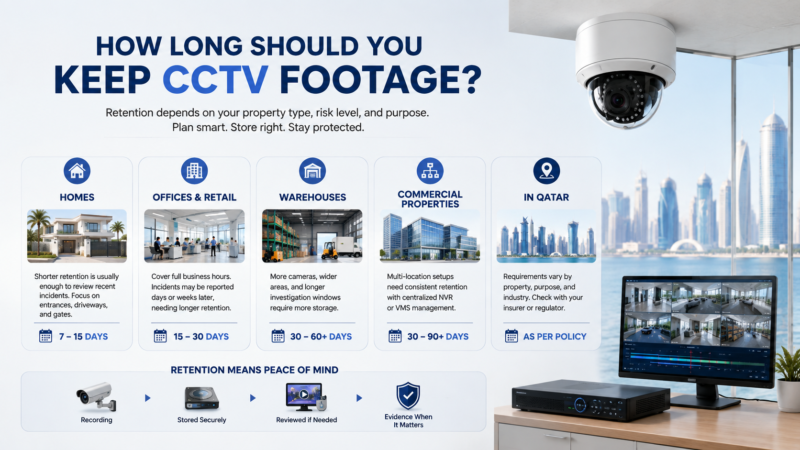
CCTV footage retention needs vary by property type, monitoring purpose, storage capacity and applicable requirements.
With the technical storage factors covered, the remaining question is a planning one: how many days of retention actually make sense for your specific property.
CCTV Retention for Homes
Shorter retention windows are often sufficient for many residential systems, particularly where the goal is catching and reviewing recent incidents rather than long-term archival. Entrances, driveways, gates, and other high-priority areas are usually the places worth prioritizing for longer retention if storage is limited, since these are the zones most likely to need footage reviewed after the fact.
CCTV Retention for Offices and Retail
Businesses generally need to account for employee and customer activity across full business operating hours, and retention decisions often come down to how long an incident might go unreported — a customer dispute or inventory discrepancy might not surface for days or weeks after it occurred, which pushes retention needs longer than a typical home setup.
CCTV Retention for Warehouses
Larger camera counts covering wide areas, often combined with continuous monitoring across loading zones, storage areas, and perimeters, tend to push total storage requirements higher. Investigation windows for warehouse incidents — theft, damage, logistics disputes — can also be longer than a typical retail scenario, which factors into how much retention is actually needed.
CCTV Retention for Commercial Properties
Multi-location commercial operations add another layer: higher aggregate storage requirements across sites, and often a centralized NVR or VMS (video management system) architecture to manage retention consistently across locations rather than leaving each site to its own local settings.
CCTV Retention Requirements in Qatar
Retention needs vary by property type, monitoring purpose, system design, and any applicable requirements specific to the business or sector involved — insurance providers, for instance, may specify their own minimum retention expectations for commercial policies. There isn’t one universal retention period that applies across every property and use case in Qatar, so it’s worth confirming specific requirements with your insurance provider, industry regulator, or a qualified installer for your particular situation rather than assuming a single fixed number applies.
How to Increase CCTV Footage Retention
Use H.265 Compression
Switching from H.264 to H.265 where supported is typically the single most effective way to extend retention without any hardware change, given the substantial file-size reduction it offers at comparable quality.
Adjust Bitrate
Lowering configured bitrate — within reason, balanced against acceptable image quality — directly reduces the data written per second of footage.
Reduce Unnecessary Frame Rate
Dropping frame rate on cameras where smooth motion capture isn’t essential (a static perimeter view, for example, versus a vehicle-plate capture point) reduces storage consumption with minimal practical downside in many positions.
Use Motion or Event Recording
Switching from continuous to motion-triggered or event-based recording is often the largest single lever available, since it directly reduces the hours per day actually being recorded.
Increase Hard Drive Capacity
The most direct fix: simply add more available storage, whether by replacing an existing drive with a larger one or adding a drive where the NVR/DVR supports it.
Expand NVR Storage
Where the NVR supports multiple drive bays, adding additional drives increases total capacity without needing to replace existing storage or reconfigure the system from scratch.
Use Cloud or Hybrid Storage
Supplementing or replacing local storage with cloud storage shifts retention limits from physical drive capacity to subscription tier, and hybrid setups can combine both — local storage for immediate access, cloud for extended or off-site backup.
Prioritize Critical Cameras for Longer Retention
Not every camera needs identical retention. Some NVR systems allow different retention settings per camera or per recording profile, letting you allocate more storage toward high-priority positions (entrances, cash registers, gates) and less toward lower-priority ones.
What Happens When the CCTV Hard Drive Is Full?
Most systems handle a full hard drive through overwrite recording — once available capacity is exhausted, the system automatically begins recording over the oldest existing footage to make room for new footage, operating as a continuous rolling loop rather than stopping recording altogether.
This is distinct from manual deletion, where footage is removed intentionally by a user rather than automatically cycled out by the system. Because overwrite happens automatically and without warning once storage limits are reached, footage that hasn’t been exported before it’s due to be overwritten is generally not retrievable afterward — which makes exporting important footage promptly, rather than assuming it’ll remain available indefinitely, a meaningful part of using any CCTV system responsibly. Storage health and drive monitoring — checking for early signs of drive wear or failure — is also worth building into regular system maintenance, since a failing drive can affect both new recording and existing stored footage.
Can Deleted CCTV Footage Be Recovered?
Whether deleted or overwritten footage can be recovered depends heavily on how the specific system stores and overwrites data, and there’s no general guarantee either way — some systems may retain partial data that specialized recovery tools can sometimes reconstruct, while others overwrite data in a way that makes recovery effectively impossible. Because recoverability can’t be promised or relied upon, the safer approach is always exporting footage you know you’ll need before it’s at risk of being overwritten, rather than assuming recovery will be possible after the fact.
How to Choose the Right CCTV Hard Drive Capacity
Choose Based on Camera Count
More cameras means more simultaneous data streams, so hard drive capacity needs to scale with the total number of cameras recording to it, not just the resolution of any single camera.
Choose Based on Resolution
Higher-resolution cameras across the system push total storage needs up proportionally, particularly on systems where most or all cameras run at 2K or 4K rather than 1080p.
Choose Based on Recording Mode
Continuous recording requires substantially more capacity than motion-triggered or scheduled recording for the same retention target, so recording mode should be decided before capacity is finalized, not after.
Choose Based on Desired Retention
Work backward from how many days of footage you actually need available, then size capacity to support that target given the camera count, resolution, and recording mode already decided.
Leave Room for Future Camera Expansion
Sizing storage only for cameras installed today risks a shorter retention window than expected once additional cameras are added later, factoring in likely future expansion up front avoids having to revisit storage planning shortly after installation.
CCTV Storage Examples for Different Surveillance Systems
The following are illustrative scenarios to show how the factors above combine in practice — not fixed specifications or guaranteed outcomes for every installation.
Small Home CCTV System
Typically a small number of cameras — often 2 to 4 — covering entrances, a driveway, and perhaps one perimeter position, commonly running either 24/7 or motion-triggered recording. Storage needs at this scale are generally modest, and short-to-medium retention (roughly one to a few weeks) is often sufficient for typical residential needs.
Medium Business CCTV System
More cameras than a home system, generally covering a wider footprint — a retail floor, an office building, or a small warehouse — often with higher overall recording activity due to business hours coverage and a larger monitored area. This scale typically calls for a larger NVR with more available storage than a basic home setup.
Large Commercial CCTV System
Larger installations, often 16 cameras or more, covering warehouses, factories, or multi-building commercial sites. High-resolution recording combined with continuous coverage across many cameras drives storage requirements substantially higher, which is why these systems typically rely on dedicated NVR or VMS architecture with larger or distributed storage — multiple drives, expandable bays, or centralized storage serving several recording units — rather than a single consumer-grade hard drive.
How to Plan CCTV Storage for Your Property
- Count your cameras — establish the total number of independent video streams the system needs to support.
- Identify resolution and bitrate — confirm what each camera is actually configured to record at, not just its maximum supported resolution.
- Determine recording hours — figure out how many hours per day recording will realistically run, based on the recording mode you plan to use.
- Choose continuous, scheduled, or event recording — this single decision has an outsized effect on total storage consumption.
- Decide how many days of retention you need — based on your property type and the guidance in the retention-planning section above.
- Select NVR, DVR, or cloud storage — based on whether local control or remote/off-site storage better fits your priorities.
- Choose suitable hard-drive capacity — sized to support your target retention given camera count, resolution, and recording mode.
- Allow room for future expansion — plan capacity with likely future camera additions in mind, not just the current install.
- Test actual retention after installation — real-world retention can differ from estimates due to scene complexity and actual bitrate, so confirming it once the system is live is worth doing rather than assuming the planning-stage estimate holds exactly.
How Long Does CCTV Footage Last?
CCTV footage doesn’t have one fixed lifespan; retention depends primarily on two things working together: available storage capacity and how fast the system is consuming that capacity, which is itself driven by camera count, resolution, bitrate, frame rate, compression, and recording mode. More cameras, higher resolution, higher bitrate, and continuous recording all consume storage faster and shorten retention for a given drive size, while H.265 compression, motion or event-based recording, and larger or expanded hard drive capacity all work in the opposite direction to extend it. The right storage capacity ultimately isn’t a single universal number — it’s whatever combination of these settings supports the retention window your specific property’s surveillance objectives actually require.
For a broader look at how camera type (AHD, IP, PTZ, WiFi, or 4G) affects both image quality and system architecture before storage even enters the picture, see our Complete Guide to CCTV Camera Types in Qatar, which also covers H.265 compression and NVR channel capacity in more detail. If you’re comparing recording architecture more broadly, our breakdown of the difference between CCTV and surveillance camera systems covers how IP cameras, PoE, and compression fit together end to end. And for pricing context on complete camera-and-NVR kits at different scales, Best CCTV Camera for Home in Qatar walks through real kit configurations and hard drive sizes for Qatar villa installations. If you’re sizing an NVR specifically, Secuview’s 8-Channel 4K NVR with ONVIF support supports up to 8TB on a single drive bay and is a common starting point for small-to-medium retention planning.
Frequently Asked Questions
How long does CCTV footage usually last?
It varies widely depending on hard drive capacity, camera count, resolution, bitrate, and recording mode. Retention can range from a few days on a small system with continuous high-resolution recording to several weeks or more on a system using motion-triggered recording and efficient compression.
How many days can a 1TB CCTV hard drive store?
It depends on how many cameras are recording to it and their settings. As a rough illustration, a single camera recording continuously at 1080p with H.265 compression might consume roughly 20GB per day, which could put a 1TB drive at around 45–50 days for that one camera alone. Multiple cameras or higher resolution would reduce the retention period significantly.
How much CCTV storage do I need for 4 cameras?
It depends on resolution, bitrate, and recording mode for each camera. A reasonable starting point is to estimate per-camera daily storage, multiply it by 4, and then multiply by your target retention in days. A 4-camera 1080p system using motion-triggered recording typically needs less capacity than the same four cameras recording continuously at 4K.
How much storage do I need for 8 CCTV cameras?
Storage needs roughly double compared with a 4-camera system when resolution, bitrate, and recording mode remain the same, since each additional camera contributes its own video stream. Eight-camera systems commonly use larger multi-terabyte drives or NVRs with multiple drive bays rather than a single small drive.
Does 4K CCTV use more storage?
Generally, yes. 4K captures significantly more image detail per frame than 1080p or 2K, which typically results in larger video files for the same recording duration. Actual storage requirements also depend on bitrate and compression settings.
Does H.265 reduce CCTV storage requirements?
Yes. H.265 generally reduces file sizes compared with H.264 at comparable visual quality. A commonly cited estimate is around 50% reduction, although actual savings vary depending on the camera, scene, bitrate, resolution, and configuration.
Does motion detection save CCTV storage?
Yes. Motion-triggered recording only records when movement is detected, which usually results in fewer recorded hours per day than continuous recording. The actual storage savings depend on how much activity occurs in the camera’s coverage area and how accurately motion detection is configured.
What happens when a CCTV hard drive becomes full?
Most CCTV systems automatically overwrite the oldest stored footage when the hard drive becomes full, creating a continuous rolling recording loop. Footage that has been overwritten is generally not recoverable, so important recordings should be exported before they are replaced.
Can CCTV footage be stored without the internet?
Yes. Local NVR and DVR systems can record footage to a local hard drive and continue functioning without an internet connection. Internet access is generally needed for remote viewing or mobile alerts, not for local recording itself. Cloud-based storage generally requires an internet connection for recording and access.
How long should a business keep CCTV footage?
It depends on the business type, operating hours, and any applicable insurance, contractual, or industry requirements. Many commercial systems are configured for at least a few weeks of retention so incidents, customer disputes, theft, and operational issues can be identified and reviewed before relevant footage is overwritten.
Can I increase CCTV recording time by adding another hard drive?
In many cases, yes. If the NVR or DVR supports multiple drive bays, adding another compatible hard drive can increase total available storage without replacing the existing drive. Check the recorder’s maximum supported capacity and compatible hard drive specifications before upgrading.
What size hard drive is best for a CCTV system?
There is no single best hard drive size because requirements depend on camera count, resolution, recording mode, and target retention period. Smaller systems using motion-triggered recording may work well with 1–2TB, while larger or continuously recording commercial systems commonly require 4TB, 8TB, or multi-drive configurations.













