
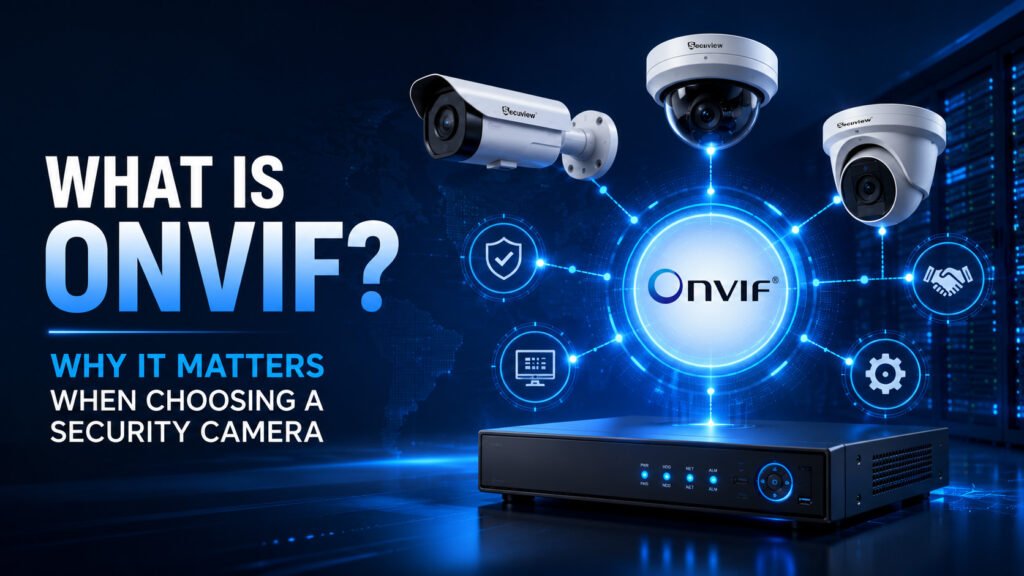
Buy a camera from one brand and an NVR from another, and there’s a real chance they simply won’t talk to each other, unless both sides support the same open standard. That standard is ONVIF, and understanding what it actually does before buying is what separates a system that can grow and mix brands over time from one that’s locked to a single manufacturer from day one. This guide covers what ONVIF is, how it actually works, its different profiles, and what to check before assuming a camera has it.
What Is ONVIF?
ONVIF stands for Open Network Video Interface Forum, an industry association that created a standardized way for IP cameras, NVRs, and other security devices to communicate with each other regardless of manufacturer. Its purpose is interoperability: without a shared standard, a camera from one company and a recorder from another would each speak their own proprietary language, with no guarantee either side understands the other. ONVIF was created specifically to solve that fragmentation, giving manufacturers a common specification to build against instead of every brand inventing its own closed system.
How ONVIF Works
ONVIF covers several distinct functions, not just one. Device discovery uses a protocol called WS-Discovery, letting a compatible NVR or software platform automatically find ONVIF devices on the same network without manual IP configuration. Communication happens over standard web protocols, HTTP and SOAP/XML messaging, carrying commands between devices in a structured, predictable format. Video streaming itself is typically handled by RTSP, a separate protocol ONVIF coordinates rather than replaces, covered in more detail below. Authentication verifies that only authorized devices and users can access a camera or its footage, and metadata exchange lets analytics data, like motion events or object detection results, pass between devices in a standardized format, not just the raw video itself.
Why ONVIF Matters When Choosing a Security Camera
Multi-brand compatibility is the headline benefit: an ONVIF-compliant camera can generally connect to an ONVIF-compliant NVR from a different manufacturer, rather than requiring both to be the same brand. This directly avoids vendor lock-in: without it, adding a single incompatible camera later can mean either replacing the whole recording system or running two separate, disconnected setups. It also makes upgrades easier, since a failing or outdated camera can often be replaced with a different brand’s ONVIF model rather than hunting for an exact discontinued match. Taken together, this is what gives a system genuine long-term flexibility, the ability to expand or adjust a security setup over years without being boxed into one manufacturer’s catalog.
Understanding ONVIF Profiles
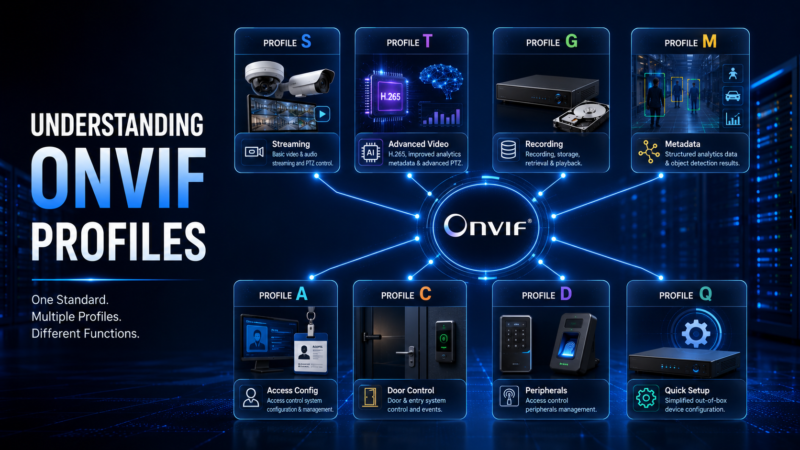
ONVIF isn’t one single specification — it’s split into profiles, each covering a different function, and a device can support one or several.
Understanding ONVIF Profiles
Profile S
The original and most common profile, covering basic video and audio streaming, along with PTZ control — this is the baseline most IP cameras are built around.
Profile T
A newer, more advanced streaming profile, adding support for H.265 compression, improved motion and analytics metadata, and more refined PTZ control than Profile S offers.
Profile G
Covers recording and storage — specifically how an NVR or recording device retrieves, stores, and plays back footage from ONVIF-compliant sources.
Profile M
Focused on metadata — structured analytics data like object detection results, built for devices and platforms doing video analysis rather than just recording raw footage.
Other ONVIF Profiles (A, C, D & Q)
Profile A and Profile C cover access control — door and entry system configuration and control, extending ONVIF beyond pure video into physical access management. Profile D covers access control peripherals more specifically. Profile Q, aimed at simplified out-of-box device configuration, is referenced less often in current product specifications than the profiles above.
ONVIF vs RTSP: What’s the Difference?
These get confused because they’re closely related, but they’re not the same thing. RTSP (Real-Time Streaming Protocol) is specifically a video streaming protocol — its only job is carrying a video feed from a camera to whatever’s requesting it. ONVIF is a much broader standard, covering discovery, configuration, authentication, PTZ control, and metadata exchange, in addition to streaming. In practice, they work together: an ONVIF-compliant camera commonly uses RTSP as the actual mechanism for delivering video, while ONVIF handles everything else around that stream — finding the device on the network, configuring it, and directing a client to the correct RTSP stream address. A camera can technically support RTSP without supporting ONVIF at all, but that camera would then need to be configured manually, with none of ONVIF’s automatic discovery or standardized control layer.
Does ONVIF Guarantee Device Compatibility?
Not automatically, and this distinction matters. ONVIF conformant products have been through ONVIF’s own formal testing process against a specific profile and appear on the organization’s official conformant products list at onvif.org. ONVIF compliant or “ONVIF compatible” is often used more loosely by manufacturers to mean a device generally follows the standard, without necessarily having completed that formal certification. In practice, this means two devices both claiming ONVIF support can still occasionally behave differently, particularly around less common features — checking which specific profile a device supports (S, T, G, and so on) is a more reliable compatibility signal than the word “ONVIF” alone. Firmware also matters: a device’s ONVIF support and profile compliance can change with firmware updates, so a camera’s real-world compatibility isn’t necessarily fixed forever at the point of purchase.
Which Security Devices Support ONVIF?
ONVIF compatibility isn’t limited to cameras — it spans much of a security system: IP cameras, NVRs, video management systems (VMS) used in larger commercial deployments, PTZ cameras specifically for standardized pan-tilt-zoom control across brands, and access control devices through the A/C/D profiles covering doors and entry systems.
Benefits of Choosing ONVIF Cameras
Flexible integration — genuinely mixing camera brands within one system rather than being locked to one manufacturer’s ecosystem. Better scalability — adding cameras from whichever brand fits a given budget or need, rather than sourcing an exact match. Easier maintenance — a failed camera can be replaced with any compatible ONVIF model rather than waiting on one specific brand’s stock. Future-proofing — a system built on an open standard isn’t stranded if one manufacturer discontinues a product line or exits the market entirely.
How to Check If a Camera Supports ONVIF
Three practical ways to confirm this before buying: check the manufacturer’s specifications directly, since ONVIF support and the specific profile (S, T, G) are normally listed on the spec sheet or datasheet; use the free ONVIF Device Manager software to scan a network and confirm what a device actually reports; or check the device against onvif.org’s own ONVIF Conformant Products List, the most authoritative source for confirming formal certification rather than just a manufacturer’s claim.
Why Secuview Supports ONVIF-Based Security Solutions
Open standards matter directly to how a security system can grow over time, which is why ONVIF compatibility runs across Secuview’s IP camera range rather than being limited to one model. The 12MP Indoor PoE Camera confirms ONVIF 17.06 and RTSP compatibility alongside auto-tracking, suited to indoor positions needing reliable multi-brand NVR integration. Outdoors, the 12MP Weatherproof Outdoor IP Camera pairs the same ONVIF 17.06 support with smart human and vehicle detection for wider coverage areas, and the 6MP Fixed Lens Outdoor IP Camera offers the same standard at a more accessible price point for a single fixed position. Across all three, the practical result is the same: none of them lock a buyer into Secuview’s own NVR exclusively — any of them can integrate into an existing multi-brand system, exactly the flexible CCTV deployment ONVIF is built to enable.
Is an ONVIF Camera Right for Your Security System?
Choose ONVIF if you:
- Plan to mix camera brands within one system
- Expect to need future expansion
- Want the flexibility to choose an NVR independently of camera brand
You may not need ONVIF if:
- You’re deliberately using a single manufacturer’s closed ecosystem end-to-end, with no plan to mix brands
- You have no plans to expand or modify the system going forward
Frequently Asked Questions
What is ONVIF?
ONVIF (Open Network Video Interface Forum) is an open industry standard that allows IP cameras, NVRs, and other security devices from different manufacturers to communicate and work together.
Why is ONVIF important for IP security cameras?
ONVIF helps prevent vendor lock-in by allowing compatible cameras and recorders from different brands to operate together. This makes it easier to expand, upgrade, or replace equipment without rebuilding your entire CCTV system.
Is ONVIF the same as RTSP?
No. RTSP (Real Time Streaming Protocol) is used for transmitting video streams, while ONVIF is a broader interoperability standard covering device discovery, authentication, configuration, metadata, and video streaming. Many ONVIF devices use RTSP to deliver the video itself.
What is the difference between ONVIF Profile S and Profile T?
Profile S supports core IP camera functions such as live video streaming, audio, and PTZ control. Profile T builds on this by adding support for H.265 video compression, improved video encoding, and more advanced analytics and PTZ capabilities.
Are all IP cameras ONVIF compatible?
No. ONVIF compatibility depends on the specific manufacturer and camera model. Always check the product specifications before assuming an IP camera supports ONVIF.
Does ONVIF guarantee compatibility between different brands?
Not completely. Devices that are officially ONVIF Conformant and support the same ONVIF profile are generally compatible, but checking the supported profile is more reliable than relying on the word “ONVIF” alone.
How can I check if my camera supports ONVIF?
You can verify ONVIF support by checking the manufacturer’s specifications, using the free ONVIF Device Manager software, or searching the official ONVIF Conformant Products List.
Can ONVIF cameras work with any NVR?
Generally yes, provided both the camera and the NVR support the same ONVIF profile. Compatibility should always be confirmed before purchase.
What devices support ONVIF?
ONVIF supports a wide range of security devices, including IP cameras, Network Video Recorders (NVRs), video management systems (VMS), PTZ cameras, video encoders, and access control equipment.
Does ONVIF support AI video analytics?
Yes. ONVIF Profile M supports standardized metadata exchange for AI-powered features such as object detection, motion classification, and other video analytics.
Can firmware updates affect ONVIF compatibility?
Yes. Firmware updates can change a device’s ONVIF implementation or supported profiles, so keeping firmware current helps maintain compatibility and access to new features.
Does Secuview offer ONVIF-compatible security cameras?
Yes. Secuview’s IP camera range includes ONVIF-compatible indoor PoE and outdoor security cameras, with ONVIF support listed in the product specifications.
Can Secuview ONVIF cameras work with third-party NVRs?
Yes. ONVIF compatibility allows Secuview IP cameras to integrate with compatible third-party NVRs, provided both devices support the same ONVIF profile.
Why choose Secuview for ONVIF-based CCTV systems?
Secuview offers ONVIF-compatible IP cameras for flexible integration with compatible recording systems, along with MOI-compliant products, local Qatar stock, and local warranty support.
Should I choose an ONVIF camera for a new CCTV installation?
For most new CCTV installations, yes. Choosing an ONVIF-compatible camera provides greater flexibility for future upgrades and allows you to mix compatible cameras and NVRs from different manufacturers.
Final Thoughts
ONVIF isn’t a feature that shows up in day-to-day use the way resolution or night vision does; it’s infrastructure that determines whether a security system can grow and adapt over years, or whether it’s quietly locked to one manufacturer’s roadmap from the first purchase. For nearly any system expected to last, expand, or mix equipment over time, it’s worth treating as a genuine buying criterion rather than a checkbox spec.













