
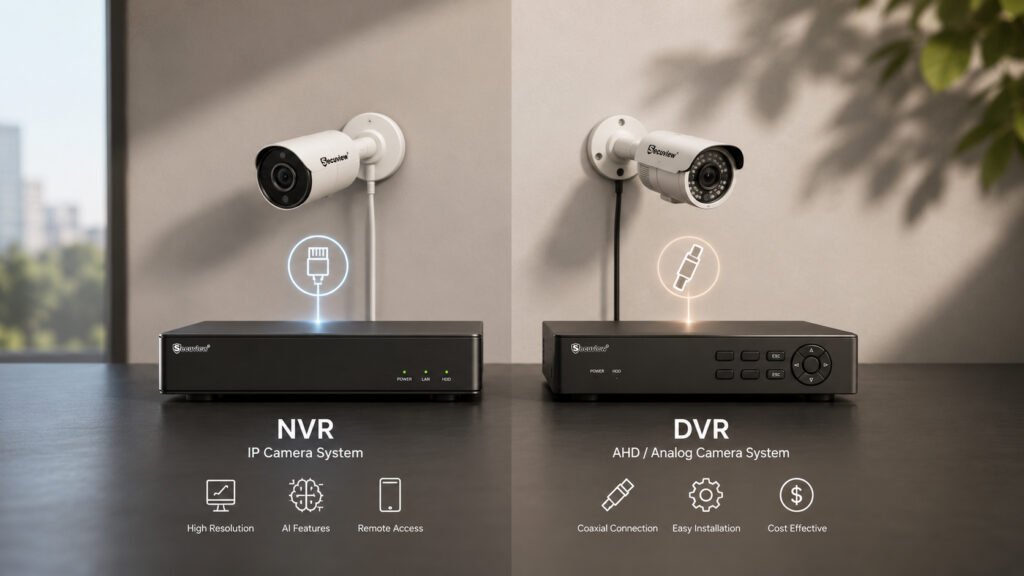
Choosing between an NVR and a DVR isn’t really a matter of one being better than the other; it’s a matter of which one actually matches the cameras, budget, and plans already in place. Buying the wrong recorder for a given camera type doesn’t just underperform; it often doesn’t work at all. This guide breaks down exactly how the two differ, compares them across every factor that actually matters, and ends with a straightforward way to decide which one fits a specific setup.
What Is a Network Video Recorder (NVR)?
An NVR receives, stores, and manages video from IP cameras over a network connection; the cameras do their own video processing before the footage ever reaches the recorder, which is what allows for higher resolution and features like AI analytics. A full breakdown of how this actually works, including storage planning and channel counts,is covered in what an NVR is and how it works; this article stays focused on how it stacks up against a DVR specifically.
What Is a Digital Video Recorder (DVR)?
A DVR receives an analog or AHD video signal over coaxial cable and does the video processing itself at the recorder, rather than at the camera. It’s worth a quick disambiguation here, since “DVR” is also the common term for a consumer TV recorder (the kind attached to a cable or satellite box), this article is specifically about the CCTV security recording device, not that. A DVR-based system typically suits smaller, budget-conscious installations using AHD or analog cameras, covered in more depth in how AHD camera systems work.
Understanding the Difference Between NVR and DVR
The difference comes down to five things: core technology (network-based vs. direct analog signal), recording method (the camera processes video first on an IP Camera Recorder
system; the recorder processes it on a DVR system), camera compatibility (IP cameras need an NVR; AHD/analog cameras need a DVR Recorder, they aren’t interchangeable), video processing location (at the camera vs. at the recorder), and network requirements (an NVR system depends on network infrastructure; a DVR system runs on a simpler direct coaxial connection with no networking knowledge required).
NVR vs DVR Comparison Table
| NVR | DVR | |
|---|---|---|
| Camera type | IP cameras | AHD/analog cameras |
| Supported camera technology | IP, ONVIF-compatible | AHD, analog (CVBS) |
| Video transmission | Network cable (Cat5e/Cat6) | Coaxial cable |
| Video quality | Higher at equivalent stated resolution | Standard AHD/analog quality |
| Audio support | Common, over the same network cable | Requires separate audio cabling on many systems |
| AI features | Common on modern models | Limited or absent |
| Installation complexity | Higher, requires network setup | Lower, simpler direct cabling |
| Storage capacity | Typically higher | Generally lower |
| Remote viewing | Native, network-based | Available, but generally more limited |
| Scalability | Easier, network-based expansion | More limited, tied to physical cable runs |
| Maintenance | Requires occasional network troubleshooting | Simpler, fewer points of failure |
| Cost | Higher | Lower |
| Best use cases | New installations, larger properties, AI/remote-monitoring needs | Existing coaxial wiring, smaller budgets, simpler installs |
Image Quality Comparison
IP camera recording through a Security Video Recorder Generally supports higher resolutions and more efficient compression; H.265 in particular reduces file size significantly compared to H.264 at the same visual quality, which matters directly for both storage planning and the bandwidth needed to stream multiple channels at once. Analog/AHD recording through a DVR is typically capped at lower resolutions and relies on H.264 or older compression, with frame rate and bandwidth usage generally lower simply because less data is being moved in the first place.
Camera Compatibility
An NVR is built for IP cameras and relies on ONVIF compatibility to work across different camera brands rather than being locked to one manufacturer. A DVR is built for AHD and analog (CVBS) cameras, and generally doesn’t understand an IP camera’s signal at all. Hybrid systems (sometimes sold as XVR units) exist specifically to bridge this — supporting both analog/AHD and IP inputs on one recorder — worth knowing about if a property has a mix of older analog cameras and newer IP ones rather than a clean single-technology setup.
Installation Differences
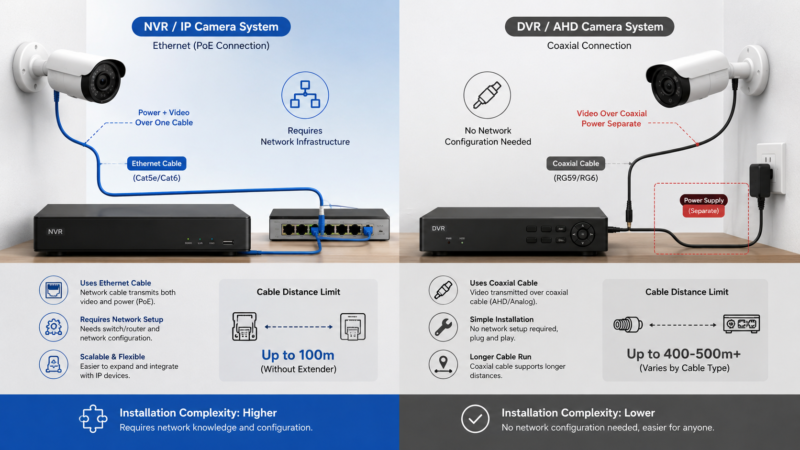
Installation Differences on nvr and dvr
An NVR system runs over Ethernet, commonly with PoE handling camera power over the same cable, and depends on functioning network infrastructure to work at all. A DVR system runs over coaxial cable, with power typically supplied separately rather than over the same cable, and doesn’t require any network configuration knowledge to install. Cable distance limits also differ meaningfully; standard Ethernet runs are limited to around 100 meters without a network extender, while coaxial cable on a DVR Recorder
system can often run considerably farther. Overall installation complexity is lower on a DVR system specifically because there’s no network layer to configure; the installation steps themselves are covered in their own dedicated guide rather than here.
Storage and Recording Performance
Both systems support HDD-based storage, but capacity and retention planning differ in practice: Network Video Recorder systems commonly support larger drives and benefit more from H.265’s storage savings, given the higher resolutions typically involved. Both support continuous recording (constant, around-the-clock) and motion-triggered recording (only recording when activity is detected, which meaningfully reduces storage need on either system), along with backup options like USB export. Bandwidth efficiency matters more on an NVR system specifically, since every camera’s stream competes for the same network capacity, a factor a DVR system’s direct coaxial connections don’t share.
Remote Viewing and Smart Features
Mobile monitoring is available on both systems, but AI analytics, motion detection with human, vehicle, or face classification, and smart alerts filtering out false triggers are far more commonly available and more capable on NVR systems, since the underlying IP camera and network infrastructure supports that kind of processing more naturally. User management, with multiple accounts and different access levels, is also more commonly a feature of NVR-based systems, particularly relevant for any installation with more than one person needing access.
Scalability and Future Expansion
Adding cameras to an NVR system generally means adding channels on existing network infrastructure, which scales more naturally as a business grows or a property expands, including across multiple sites on the same network. An Analog CCTV Recorder system’s expansion is tied more directly to physical cable runs already in place, making significant growth or multi-site deployment considerably more limited than on a network-based system.
Which Recorder Is Better for Home Security?
For an apartment, a small DVR or NVR system both work reasonably well depending on existing wiring. For a villa or duplex house, an NVR system tends to make more sense given the larger number of entry points and perimeter positions typically involved. For a genuine smart home setup already built around app-based control and automation, an NVR system’s native remote access and AI features fit that ecosystem more naturally. Small residential buildings generally follow the same logic as apartments — existing wiring and budget usually decide it more than any inherent superiority of one system over the other.
Which Recorder Is Better for Businesses?
Offices, retail shops, and restaurants typically benefit from an NVR system’s AI features, human detection at an entrance, for instance, and remote monitoring across multiple locations. Warehouses, factories, and farms (mazraa) covering large areas benefit from IP Security Recording System scalability as camera counts grow. Hotels and larger commercial buildings with many entry points and the need for centralized, remote-accessible monitoring lean toward Network Video Recorder systems for the same reasons. Parking areas specifically benefit from AI vehicle detection, which is far more commonly available on NVR-based systems than DVR ones.
Choose an NVR If
- You use IP cameras
- You want 4K or higher resolution
- You need AI features like human or vehicle detection
- You want strong native remote monitoring
- You plan to expand the system significantly over time
- You need flexible, network-based expansion
Choose a DVR If
- You already own analog or AHD cameras
- You have existing coaxial cabling in place
- You need a lower initial budget
- Your installation is small and unlikely to grow much
- AI features aren’t a priority for how the system will actually be used
Which CCTV Recorder Should You Buy?
The decision comes down to working through a handful of practical questions in order: what cameras are already owned or planned (IP points to NVR, AHD/analog points to DVR), what the budget actually allows, how large the property is and how many channels it realistically needs, whether reliable internet is available for remote monitoring, how much storage the retention requirements demand, whether the system needs to grow significantly later, and whether AI-driven smart features are actually going to get used rather than just sound good on a spec sheet. Camera type is usually the deciding factor on its own; the rest of these questions mostly matter for choosing which specific NVR or DVR model within that already-determined category.
This comparison covers recording systems specifically. For how NVR and DVR fit alongside every camera technology they connect to- AHD, IP, PTZ, WiFi, and 4G- a full comparison of CCTV camera types covers the broader picture this article’s recorder comparison sits inside.
Frequently Asked Questions
What is the difference between an NVR and a DVR?
An NVR works with IP cameras and receives already-processed digital video over a network. An Analog CCTV Recorder works with AHD or analog cameras and processes the video signal itself after receiving it over coaxial cable.
Which recorder is better for IP cameras?
An NVR is the correct choice for IP cameras because it is designed to receive and record digital video streams directly from network cameras. Standard DVRs are not built to process IP camera signals.
Can I use analog cameras with an NVR?
Generally no. Analog and AHD cameras require a DVR or a hybrid XVR recorder that is specifically designed to support both analog and IP camera technologies.
Can I connect IP cameras to a DVR?
Most standard DVRs cannot process IP camera video. If you need to use both camera types, a hybrid XVR recorder is typically required.
Which offers better video quality, NVR or DVR?
NVR systems generally support higher recording resolutions and more efficient video compression, resulting in better image quality than traditional DVR systems.
Is PoE available on every NVR?
No. Some NVRs include built-in PoE ports that power connected cameras, while others require cameras to receive power from a separate PoE switch or injector.
Which recorder is easier to install?
DVR systems are generally easier to install because they use straightforward coaxial cable connections. NVR systems require basic network configuration but provide greater flexibility and features.
Which CCTV recorder is best for home security?
The best choice depends on your property and existing wiring. For new installations and larger homes, NVR systems usually offer better image quality, smart AI features, and easier remote monitoring.
Which recording system is better for businesses?
Businesses typically benefit more from NVR systems because they support higher resolutions, AI-powered analytics, centralized monitoring, and easier expansion.
Can I upgrade from a DVR to an NVR?
Yes. Upgrading typically requires replacing both the recorder and the cameras because analog cameras are not directly compatible with NVR systems unless a hybrid recorder is used.
Does an NVR require an internet connection?
No. Local recording works without internet access. Internet is only required for remote viewing, mobile apps, and notifications.
How many cameras can an NVR or DVR support?
Both NVRs and DVRs are available in multiple channel counts, commonly from 4 channels up to 64 channels or more, depending on the installation requirements.
Which recorder is better for future expansion?
An NVR system is generally the better long-term investment because network-based camera systems are easier to expand than traditional DVR systems.
Can an NVR and DVR work together?
Not directly. A hybrid XVR recorder can support both IP and analog cameras in a single surveillance system.
Should I choose an NVR or DVR for a new CCTV installation?
For a new CCTV installation, an NVR system is generally the best choice because it supports higher-quality IP cameras, advanced AI features, and easier future expansion. DVR systems remain useful where existing analog cameras or coaxial cabling are already in place.













