
You’ve bought IP cameras. Somewhere in the setup process, a question comes up that the camera listing itself never quite answered: do you actually need an NVR, and if so, what does it do that the camera doesn’t already do on its own? This guide answers that directly: what this recording device is, how it fits into an IP camera system, the different types available, and what actually matters when choosing one.
Why Were NVRs Created?
The NVR exists because of a fairly direct chain of technology moving forward. Early analog CCTV cameras sent a raw video signal down coaxial cable with no recording built in at all. The DVR (Digital Video Recorder) arrived to solve that, digitizing and storing analog camera footage at the recorder itself. Then IP cameras appeared, cameras that digitize and compress their own video internally, before it ever reaches a cable, which meant the recording device on the other end no longer needed to do that processing itself, just receive, store, and manage an already-digital stream. This network-based recording system is what filled that role. Each step in this chain solved a limitation of the one before it, and understanding that progression makes it clearer why an NVR and a DVR aren’t interchangeable; they were built for genuinely different camera generations, covered in full in the comparison further down.
What Is an NVR?
NVR stands for Network Video Recorder — a dedicated IP camera recorder that receives, stores, and manages video footage from IP cameras over a network connection. Its purpose is straightforward: an IP camera captures and processes its own video, but something still needs to store that footage long-term, let someone view it live, and make recorded footage searchable and playable later. That’s the job this security video recorder exists to do. It’s used specifically because IP cameras communicate digitally over a network rather than sending an analog signal, which means the recording device on the other end needs to understand network video streams rather than a direct analog feed — the same distinction covered in full in Secuview’s guide to how IP cameras work.
What Does an NVR Actually Do?
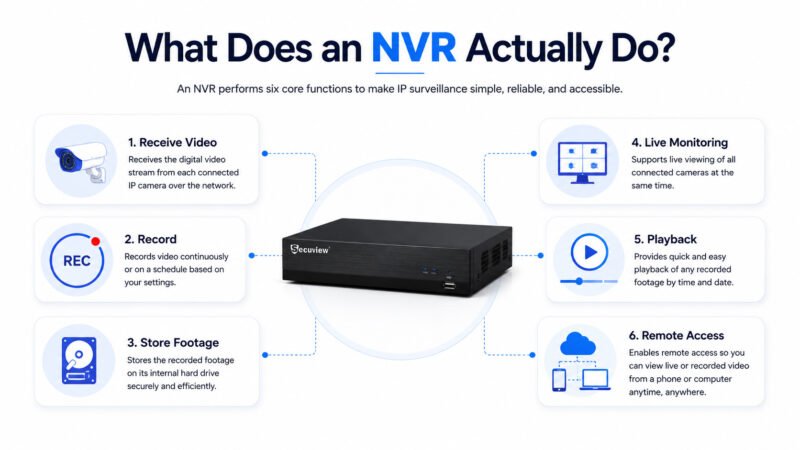
What Does an NVR Actually Do
An IP surveillance recorder’s job breaks down into a handful of concrete functions: it receives the digital video stream each connected camera sends over the network, records that stream continuously or on a schedule, stores the resulting footage on its internal hard drive, supports live monitoring of every connected camera at once, provides playback of anything already recorded, and enables remote access so footage can be checked from a phone or computer away from the physical unit. Every feature covered later in this guide is really just a more detailed look at one of these six core functions.
How Does an NVR Work?
The process runs in a fairly linear chain from camera to viewer:
The IP Camera Captures Video
The camera’s own sensor captures the raw image and immediately encodes it into a compressed digital format — this processing happens at the camera itself, not at the recorder.
The Video Travels Through the Network
The compressed video stream is sent over a network cable (or, on PoE models, the same cable also carrying power) toward the recording unit.
The Recorder Receives the Video Stream
It accepts incoming streams from every connected camera simultaneously, keeping each one as a separate channel.
The Video Is Encoded and Indexed
This IP video recorder may apply further compression and add metadata, including an index tying each frame to a specific timestamp — this indexing is what lets someone jump directly to 3:47 pm on a specific date during playback, rather than the system having to scan through hours of footage to find that moment.
Footage Is Stored on the Hard Drive
The processed, indexed video writes to the internal hard drive, typically in a continuous loop that overwrites the oldest footage once the drive reaches capacity, unless configured otherwise.
The Footage Can Be Viewed Live or Played Back
A connected monitor, a mobile app, or a remote desktop client can show any camera’s live feed, or use that index to pull up previously recorded footage by time and date.
System Architecture: How Everything Connects
Beyond the data processing steps above, it helps to see the physical network path a step at a time: the camera captures and encodes video, that stream passes through a network switch (often a PoE switch, if cameras draw power this way), the switch connects to the router managing the local network, and the recorder sits on that same network, receiving every camera’s stream and handling storage and playback. On a non-PoE setup like Secuview’s current model, the switch specifically handling PoE power delivery is a separate device from the recorder itself — the two are connected on the same network, but perform genuinely different jobs.
Main Components of an NVR
This network recording system combines several distinct parts working together: a CPU handling video processing and system operations, a hard drive for actual storage capacity, a LAN port connecting the unit to the network, PoE ports on models that supply camera power directly (absent on non-PoE units), HDMI/VGA outputs for connecting a monitor, USB ports for backup or peripheral devices, a broader network interface managing all camera connections at once, and the software — either onboard firmware or a companion app — tying live view, playback, and remote access together into one interface.
Types of NVR
| Type | How it powers cameras | Best for |
|---|---|---|
| PoE NVR | Supplies power to cameras directly through its own PoE ports | Simpler installs — one device handles both power and recording |
| Non-PoE NVR | Cameras are powered separately, often via an external PoE switch | Installations where power delivery is already handled by existing network infrastructure |
| Wireless NVR | Receives camera streams over WiFi rather than a wired network | Positions where running network cable to the recorder itself isn’t practical |
Secuview’s currently confirmed IP CCTV recorder is the 8-channel 4K Non-PoE model — the right fit specifically where cameras already receive power through an external PoE switch or existing network infrastructure, rather than needing the recorder itself to supply it. This is a genuinely common setup rather than a limitation: many structured installations separate power delivery (a dedicated PoE switch) from the recording unit by design, for easier troubleshooting if either component needs replacing independently. A PoE or wireless model isn’t currently part of Secuview’s range — worth knowing upfront if either of those specific types is what a given installation actually needs.
Advantages of Using an NVR
Better image quality. Because video is compressed at the camera itself rather than at the recorder, this kind of IP recording system generally delivers sharper footage than analog DVR systems at comparable stated resolutions.
Built specifically for IP cameras. An NVR is the correct recording device for any IP-based system; AHD and analog cameras need a DVR instead, covered in the comparison below.
Easier remote viewing. Network-based footage is naturally suited to mobile app access and remote playback, since the video is already digital and network-transmitted by the time it reaches the recorder.
Expandable. Adding more cameras to this kind of system generally means adding more channels rather than rewiring the whole installation.
Supports smart AI functions, covered in more depth further down.
Higher storage capacity options. These recorders commonly support larger drives and, on higher-end multi-bay models, RAID configurations for redundancy, also covered below.
Simpler cable management on PoE systems. Where the recorder itself supplies PoE, one cable per camera handles both power and data, reducing the total cabling an installation needs.
Disadvantages of an NVR
Higher initial cost than a comparable DVR/AHD setup, particularly once IP camera pricing is factored in alongside the recorder itself.
Requires some networking knowledge — IP addressing, network configuration, and troubleshooting are more involved than a DVR’s simpler direct-cable setup.
Depends on the network functioning correctly. Since every camera communicates over the network, network issues can affect the whole system rather than just one camera.
IP camera compatibility isn’t universal. Not every IP camera works with every recorder — ONVIF compliance, covered later, is what actually determines cross-brand compatibility.
How Much Storage Does an NVR Need? A Worked Calculation
Storage need scales with camera count, recording days, and bitrate together, not any single factor alone. Using a common mid-range estimate of roughly 4 Mbps per camera on continuous H.265 recording — actual usage varies by resolution, scene complexity, and motion, so treat this as an illustrative planning figure, not a guarantee:
| Cameras | 30 Days of Continuous Recording (approx.) |
|---|---|
| 4 cameras | ~2.5 TB |
| 8 cameras | ~4.9 TB |
| 16 cameras | ~9.8 TB |
Worth noting against Secuview’s current model specifically: at 8 channels, roughly a month of continuous recording at this estimate fits comfortably within the unit’s 8TB single-drive maximum. A 16-channel system at the same retention period would exceed what a single 8TB drive can hold, which is exactly the kind of planning question worth working through before buying rather than after the drive fills up. Switching from continuous recording to motion-triggered recording reduces all of these figures substantially, often by more than half, since footage is only written when something actually happens rather than constantly.
Understanding RAID
RAID (Redundant Array of Independent Disks) is a way of combining multiple hard drives so a system can survive one drive failing without losing footage — relevant on multi-bay recorders with two or more drive bays, though not applicable to Secuview’s current single-bay model. RAID 0 stripes data across drives for more capacity and speed, but with zero redundancy — if one drive fails, everything on it is lost, which makes it a poor choice for security footage specifically. RAID 1 mirrors data across two drives, so either drive failing still leaves a complete copy intact, at the cost of losing half the total capacity to that duplication. RAID 5 stripes data with parity information across three or more drives, balancing capacity and redundancy more efficiently than RAID 1, and is the more common choice on higher-end, multi-bay commercial systems.
Bandwidth Requirements: Network Throughput
Storage answers “how much data accumulates over time”; bandwidth answers a separate question — “how much data needs to move through the network at any given moment.” Using the same 4 Mbps per-camera estimate: 8 cameras × 4 Mbps works out to roughly 32 Mbps of sustained throughput the network and recorder both need to handle simultaneously. This matters separately from storage capacity — a drive large enough to hold months of footage doesn’t help if the network switch connecting the cameras can’t actually carry that much data at once without dropping frames.
Can an NVR Work with AI? Smart NVR, Face Recognition, and LPR
“AI NVR” and “smart NVR” generally refer to a video recording system capable of running analysis beyond basic motion detection — human and vehicle classification to cut down false alerts, face recognition for identifying known individuals, and LPR (License Plate Recognition) for automatically logging vehicle plates at an entrance or gate. This processing can happen either at the camera itself or at the recorder, depending on how a given system is designed. It’s worth checking specifically which AI features, if any, a particular setup actually supports rather than assuming “smart” or “AI” on the box means every one of these features is included — they vary meaningfully between models.
With the core of what an NVR is and how it works fully covered, the comparisons and buying questions come next.
NVR vs DVR
| NVR | DVR | |
|---|---|---|
| Camera type | IP cameras | AHD/analog cameras |
| Video processing | At the camera | At the recorder |
| Video quality | Generally higher at equivalent resolution | Standard analog/AHD quality |
| Installation | Network cable (Cat5e/Cat6) | Coaxial cable |
| AI features | Common on modern models | Limited or absent |
| Storage | Typically higher capacity | Generally lower |
| Cost | Higher | Lower |
| Future expansion | Easier — network-based | More limited |
The short version: an NVR and a DVR aren’t interchangeable, because they’re built for fundamentally different camera types, going back to the historical progression covered at the start of this guide. This table only covers the essentials — for the complete picture, including image quality, installation differences, and a full decision guide for choosing between them, a full comparison of NVR and DVR recording systems covers that in depth.
NVR vs Cloud Recording
| NVR (Local Recording) | Cloud Recording | |
|---|---|---|
| Storage location | On-site hard drive | Remote servers |
| Ongoing cost | One-time hardware cost | Typically a recurring subscription |
| Access if internet drops | Local recording continues | Recording depends on connectivity |
| Physical risk | Vulnerable if the recorder itself is stolen or damaged | Footage safe even if on-site hardware is compromised |
| Best for | Larger systems, lower long-term cost | Smaller systems prioritizing off-site backup |
NVR vs NAS
| NVR | NAS (Network Attached Storage) | |
|---|---|---|
| Primary purpose | Built specifically for video surveillance | General-purpose network file storage |
| Camera management | Native — designed for direct camera integration | Requires separate video management software |
| Ease of setup | Simpler for a dedicated CCTV system | More flexible, more configuration required |
| Best for | A standalone security system | Properties already running a NAS for other storage needs, adding video as one use case among several |
Key Features to Check Before Buying an NVR
- Number of channels — how many cameras it can support at once
- PoE support — whether it supplies camera power directly or requires external power
- HDD capacity — how much footage it can store, and for how long, per the calculation above
- RAID support — redundancy for higher-end, multi-drive systems, per the explanation above
- H.265 compression — meaningfully reduces storage needs at the same resolution and retention period
- ONVIF compatibility — determines whether cameras from different brands can actually work with the recorder
- Mobile app — for live view and remote playback
- HDMI/VGA output — for connecting a physical monitor
- AI functions — motion-zone, human/vehicle, face, or license plate detection, where supported
- Remote access — viewing footage from outside the local network
- Backup options — USB or network-based export of recorded footage
- User management — multiple accounts with different access levels, relevant for larger installations
How Many Channels Do You Need?
| Channels | Typical fit |
|---|---|
| 4 | A small home or single-room business |
| 8 | A villa, small office, or shop with multiple entry points |
| 16 | A larger commercial property or small warehouse |
| 32 | A warehouse or factory mixing fixed cameras with one or two PTZ units covering open areas |
| 64 | Large multi-building or enterprise-scale sites |
At the 16-32 channel scale, H.265 compression stops being optional — the storage savings over a year of continuous recording across that many channels are substantial enough to affect hardware planning directly, per the storage calculation above. Secuview’s currently confirmed recorder covers the 8-channel tier; higher channel counts aren’t yet part of the range.
Where Should You Use an NVR?
Anywhere running IP cameras: homes, villas, apartments, warehouses, offices, restaurants, hotels, factories, farms, retail shops, schools, hospitals, parking areas, and construction sites. The recording system itself doesn’t change much across these settings — what changes is channel count and storage needs, both covered above.
Worked Example: Setting Up an 8-Channel NVR for a Small Office
Rather than leaving “office” as an abstract use case, here’s how all 8 channels on a recorder like Secuview’s current model might realistically get allocated in a small office: one camera on the reception area covering visitor entry, one on the cashier or payment point if the office handles transactions, one on the main entrance, one or two on the parking area outside, one covering a server room or equipment storage area, and the remaining channels split between hallways or secondary entrances. Eight channels sounds like a lot in the abstract, but a real small-office layout tends to use them up faster than expected once every distinct area gets its own coverage point.
Common Mistakes When Buying an NVR
Buying too few channels for future camera additions — a very common version of this: choosing a 4-channel unit because that matches the current camera count, then needing a 5th or 6th camera a year later and discovering there’s no room left, forcing a full replacement rather than a simple addition.
Ignoring HDD capacity relative to how many days of footage actually need to stay accessible before being overwritten — the storage calculation above is exactly this planning step.
Ignoring ONVIF support, then discovering a preferred camera brand doesn’t actually work with the recorder.
Buying without PoE when the installation plan assumed the recorder would supply camera power, without arranging a separate PoE switch.
Ignoring H.265 support, which meaningfully affects storage costs at scale, as covered above.
Mixing incompatible cameras, assuming any IP camera works with any recorder regardless of brand or protocol support.
The Future of NVR Technology
The broader direction this technology is heading includes deeper AI analytics built into the recorder itself rather than requiring separate software, hybrid setups combining local storage with cloud backup rather than treating them as an either/or choice, edge AI processing footage at the camera before it ever reaches the recorder, and more capable object and face search across recorded footage rather than manually scrubbing through timestamps. These are industry-wide directions worth being aware of when planning a system meant to stay useful for several years, rather than specific claims about any single current Secuview product.
Who Should Buy an NVR?
Homeowners and businesses running IP camera systems, including warehouses, hotels, retail properties, farms, and construction sites — essentially anyone who has chosen IP cameras over AHD needs this kind of recording system specifically, since AHD systems use a DVR instead.
Frequently Asked Questions
What is an NVR in CCTV?
An NVR (Network Video Recorder) is a device that receives, stores, and manages video footage from IP cameras over a network connection.
What does NVR stand for?
NVR stands for Network Video Recorder.
What is the difference between NVR and DVR?
An NVR works with IP cameras and receives already-processed digital video over a network connection. A DVR works with AHD or analog cameras and processes the video signal itself, typically receiving it through coaxial cable.
Does an NVR work without the internet?
Yes. An NVR can record and display footage locally through a connected monitor without internet access. Internet is only required for remote viewing when you are away from the local network.
Can I connect WiFi cameras to an NVR?
Some NVRs support WiFi cameras, but many standard NVR systems are designed primarily for IP cameras connected through Ethernet or PoE. Always check camera and recorder compatibility before purchasing.
Can an NVR work with PoE cameras?
Yes. A PoE NVR can power cameras directly through built-in PoE ports. Non-PoE NVRs can also work with PoE cameras by using an external PoE network switch.
How many cameras can an NVR support?
The number of cameras an NVR supports depends on its channel count. Small systems may support 4 channels, while larger commercial systems can support up to 64 channels or more.
How much storage does an NVR need?
NVR storage requirements depend on camera resolution, compression format, number of cameras, recording settings, and how many days of footage you want to retain. H.265 compression can significantly reduce storage requirements compared with older formats.
Can I access my NVR remotely?
Yes. An NVR can be accessed remotely through a mobile app or remote viewing software when it is connected to the internet and remote access has been configured.
Is an NVR better than cloud storage?
Neither option is universally better. An NVR avoids ongoing subscription fees and continues recording locally if the internet connection fails, while cloud storage protects footage if the physical recorder is stolen or damaged. Many security systems use both options together.
Does an NVR improve video quality?
An NVR does not increase the original camera resolution. Video quality depends on the camera itself, while the NVR manages storage efficiency, playback, recording organisation, and video processing.
Can I use different brands of IP cameras with an NVR?
Yes, in many cases. Different brands of IP cameras and NVRs can work together when both devices support ONVIF compatibility.
What is ONVIF support in an NVR?
ONVIF is a standard communication protocol that allows IP cameras and recording devices from different manufacturers to work together instead of being restricted to the same brand.
How long does an NVR keep recordings?
An NVR usually stores recordings until the hard drive becomes full, after which most systems automatically overwrite the oldest footage. The exact retention period depends on HDD capacity, camera resolution, compression format, and recording settings.
Which NVR is best for home security?
For most homes, an NVR with 4 to 8 channels is usually sufficient. Secuview’s current 8-channel NVR is suitable for villas and small properties requiring coverage of multiple entrances and areas.













