
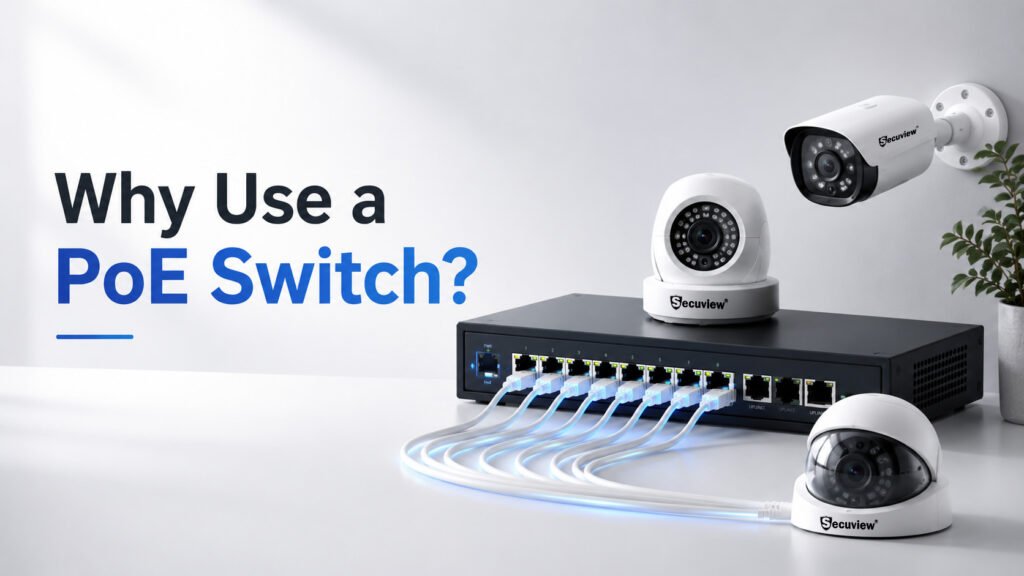
An IP camera needs two things to function: power and a data connection back to the network. A PoE switch is what lets a single Ethernet cable deliver both at once, and that one fact is the reason PoE switches have become close to standard equipment in any serious IP camera installation, rather than an optional accessory. This guide explains what PoE actually is, how a PoE switch fits into a camera system, and why it matters specifically for security cameras.
Understanding Power over Ethernet (PoE)
What Is Power over Ethernet? PoE is a standard, defined under IEEE 802.3, that allows electrical power to be transmitted over the same Ethernet cable already carrying network data — no separate power cable or wall adapter required at the powered device.
How PoE Delivers Power and Data. A PoE-capable switch (or injector) sends DC voltage down the spare or shared pairs inside a standard Ethernet cable, alongside the existing data signal, to any connected device built to accept it — a camera, an access point, a VoIP phone.
PoE Standards at a Glance
| Standard | Power Supplied (at switch) | Power Received (at device, after cable loss) | Typical use |
|---|---|---|---|
| IEEE 802.3af | 15.4W | ~12.95W | Standard fixed IP cameras |
| IEEE 802.3at (PoE+) | 30W | ~25.5W | PTZ cameras, higher-draw devices |
| IEEE 802.3bt (PoE++) | 60-100W | Varies by class | Demanding devices well beyond typical camera needs |
The gap between supplied and received power is normal cable loss, not a fault — it’s why sizing a switch on supplied wattage alone, without headroom, can leave less usable power at the camera end than expected.
Why PoE Was Developed. Before PoE, every network device needing power required its own separate electrical run, regardless of how close or far it sat from an outlet — a real limitation for devices mounted somewhere a power socket was never installed, like a ceiling corner or an external wall. PoE was developed specifically to remove that constraint, letting data infrastructure double as power infrastructure.
What Is a PoE Switch?
A PoE switch is a network switch that supplies electrical power through its Ethernet ports in addition to normal data switching — functioning as both the network hub and the power source for every PoE-capable device connected to it.
How Does a PoE Switch Detect Compatible Devices?
Before applying any power, a PoE switch runs a detection and negotiation process defined under the IEEE standard, and this matters more than it might seem — it’s what makes PoE safe to use without accidentally damaging equipment.
IEEE negotiation: the switch sends a very low, harmless voltage down the cable and checks for a specific resistance signature that only a genuine PoE-capable device presents.
Detecting powered devices: if that signature is detected, the connected device identifies itself and, on more advanced implementations, signals its power class — telling the switch roughly how much wattage it actually needs.
Safe power delivery: only after this handshake succeeds does the switch apply full operating voltage to that port.
Preventing damage: a non-PoE device plugged into the same port — a regular computer, an unpowered network device — never receives that low detection voltage as a “yes,” so full power is never applied, protecting equipment that was never built to accept it.
Main components of the switch itself include the PoE-enabled Ethernet ports, an uplink port connecting the switch to the wider network, the internal switching chip handling data traffic, and a power supply unit sized to the switch’s total power budget. Types of PoE switches range from small unmanaged units for straightforward installs up to managed switches offering per-port control, VLANs, and traffic monitoring.
Why a PoE Switch Is Essential for IP Security Cameras
Power and data through one cable. This is the core benefit everything else follows from — one Ethernet run to each camera position handles both requirements, rather than coordinating separate power and data infrastructure to the same point.
Simplified installation. No electrician needed to run mains power to each camera location — a single cable run per camera, terminated at the switch, is the entire job.
Reliable camera connectivity. Unlike a WiFi connection, a wired PoE connection isn’t subject to signal interference, distance-related dropout, or network congestion from other wireless devices sharing the same spectrum.
Easier system expansion. Adding another camera generally means running one more cable to an available switch port, rather than reworking existing power wiring to accommodate a new device.
Reduced installation costs. Eliminating separate electrical runs to every camera position removes a real cost — both material and labor — that a non-PoE-wired installation would otherwise incur.
How a PoE Switch Works in an IP Camera System
PoE switch + IP cameras: each camera connects to a switch port via Ethernet, drawing both power and carrying its video data over that same physical link. PoE switch + NVR: the switch sits between the cameras and the recorder, aggregating every camera’s stream and forwarding it to the NVR over the network — the NVR itself doesn’t need to be PoE-capable if the switch is already handling camera power, the same non-PoE NVR setup covered in this guide to how NVR systems work. PoE switch + router: the switch’s uplink port connects to the broader network router, which is what enables remote access to the system from outside the local network. Typical network architecture, put together: cameras connect to the PoE switch, the switch connects to the NVR for recording and to the router for internet access, and the router provides the path out to a mobile app or remote viewing client.
PoE Switch vs Other Camera Connection Methods
PoE vs WiFi cameras.
A WiFi camera removes the cable entirely, trading PoE’s power+data reliability for wireless installation flexibility — worth revisiting how WiFi cameras actually work for the full trade-off between the two approaches.
PoE switch vs standard network switch.
A standard switch handles data only — connecting a camera to one still requires separate power delivered another way. A PoE switch removes that requirement entirely.
PoE Switch vs PoE Injector.
These solve the same underlying problem at very different scales. A PoE injector is a single-port device that adds PoE capability to one existing non-PoE network connection — useful for adding one PoE camera to a network that otherwise has no PoE infrastructure, without replacing the whole switch. A PoE switch, by contrast, is built for a purpose-designed multi-camera system from the outset, supplying power and switching to every connected device from one unit. For a single camera added to an existing setup, an injector is often the simpler, cheaper fix; for any new installation with more than one or two cameras, a PoE switch is the more scalable, more sensible choice.
PoE switch vs PoE NVR.
Some NVRs include built-in PoE ports, functioning as both recorder and power source in one device — reasonable for a small, fixed camera count, but less flexible than a dedicated PoE switch when a system needs to scale, since the NVR’s port count becomes a hard ceiling.
IP cameras vs PoE cameras.
Not every IP camera is PoE-capable — some run on WiFi with separate power, or on 4G with solar or battery power, as covered in Secuview’s 4G camera guide. “IP camera” describes how the camera encodes and transmits video; “PoE camera” specifically describes how it receives power — related but genuinely separate characteristics.
Choosing the Right PoE Switch
Working Out Your Power Budget
Rather than just “calculate the wattage,” here’s what that actually looks like in practice. Take 8 standard fixed IP cameras, each drawing roughly 10W under typical conditions:
8 cameras × 10W = 80W minimum requirement.
But sizing a switch to exactly 80W is a mistake worth avoiding. The right target adds 20-30% spare capacity on top — landing on a 120W switch rather than an 80W one. That headroom exists for real reasons: cameras with IR illuminators or built-in heaters draw more power meaningfully at night or in cold conditions than their daytime average, the switch itself loses some power to internal inefficiency before it ever reaches a port, and spare capacity means adding one or two more cameras later doesn’t immediately force a switch replacement.
Should You Choose Fast Ethernet or Gigabit PoE?
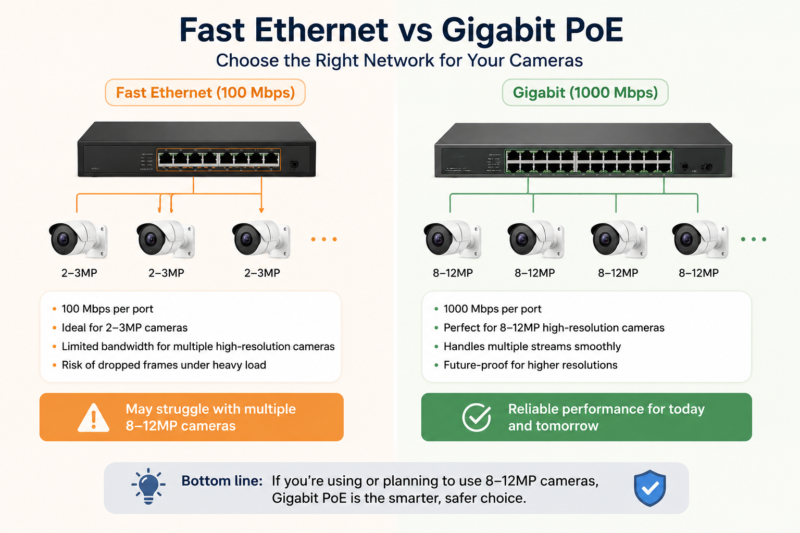
Should You Choose Fast Ethernet or Gigabit PoE
Fast Ethernet (100 Mbps) and Gigabit (1000 Mbps) describe the maximum data throughput each port can handle — and the difference matters more as camera resolution climbs. A single 2-3MP camera stream generally fits comfortably within 100 Mbps. But stack several 8-12MP cameras — the resolution tier common across Secuview’s current IP range — on one switch, and their combined bandwidth can approach or exceed what Fast Ethernet can carry, risking dropped frames under load. Gigabit removes that ceiling, which is why it’s the safer default for any installation using higher-resolution cameras or planning to upgrade to them later.
How Many Ports Do You Need?
| Port count | Typical fit |
|---|---|
| 4-port | A small home or single-room business |
| 8-port | A villa, small office, or shop with several camera positions |
| 16-port | A larger commercial property or small warehouse |
| 24-port | Large multi-camera commercial or hospitality deployments |
Full sizing guidance by camera count and budget, with real product pricing across every tier, is covered in Secuview’s complete PoE switch buying guide for Qatar — this section covers the reasoning; that guide covers the specific model recommendations.
Common PoE Switch Installation Best Practices
Cable choice (Cat5e vs Cat6), the 100-meter distance limitation per run, rack installation, and cable management are all covered with practical, Qatar-specific detail in the buying guide — this article stays focused on the conceptual side rather than repeating that installation detail here.
Limitations of PoE Switches
Power budget limitations.
A switch’s total power output is fixed — enough ports for cameras doesn’t guarantee enough total wattage if several higher-draw devices, like PTZ cameras, are on the same switch, which is exactly what the spare-capacity calculation above is meant to protect against.
Ethernet distance limits.
Standard Ethernet, PoE included, is limited to roughly 100 meters per run without an extender or repeater.
When WiFi may be better.
For a single temporary camera, or a position where running any cable at all is impractical, a WiFi camera remains the more sensible choice over extending PoE infrastructure to reach it.
Industries That Benefit from PoE Switches
Homes, offices, retail stores, warehouses, schools, hotels, and commercial buildings all benefit from the same core advantage — reliable, centrally powered camera infrastructure that scales as a property’s camera count grows.
Why Secuview Recommends PoE-Based Security Systems
Reliable surveillance infrastructure and easy camera expansion are the two practical reasons PoE-based systems are the standard recommendation across Secuview’s residential and commercial deployments alike. For a small installation, the 4-Port 65W Gigabit PoE Switch covers a typical home or small office camera count; for a mid-size shop or office, the 8-Port 120W Gigabit PoE Switch fits the worked power-budget example above almost exactly; for larger commercial deployments, the 16-Port 300W Gigabit PoE Switch scales to handle significantly more cameras, including higher-draw PTZ units, with the 24-Port 300W switch covering the largest deployments. The full range — Secuview’s PoE switch collection — covers every tier, and CCTV accessories cover the cabling and mounting hardware a complete installation also needs.
Is a PoE Switch Right for Your Security System?
Choose a PoE switch if you: – Want reliable, wired IP camera connectivity – Need centralized power management across multiple cameras – Plan future system expansion – Want a professional, clean installation
You may not need one if: – You’re using only WiFi cameras – You have a single temporary camera – Wired reliability isn’t a real requirement for the installation
Frequently Asked Questions
What is a PoE switch?
A PoE (Power over Ethernet) switch is a network switch that delivers both electrical power and network data through a single Ethernet cable to connected devices such as IP security cameras.
What does PoE mean?
PoE stands for Power over Ethernet, a networking standard that allows electrical power and data to travel over the same Ethernet cable.
Why is a PoE switch important for IP security cameras?
A PoE switch eliminates the need for separate power cables for each camera, making installation faster, reducing wiring costs, and providing a more reliable wired connection than wireless alternatives.
Does every IP camera need a PoE switch?
No. Only PoE-compatible IP cameras require a PoE switch. Wi-Fi cameras, battery-powered cameras, and 4G solar cameras use different methods for power and connectivity.
What is a PoE power budget?
A PoE power budget is the total amount of electrical power a PoE switch can supply across all of its ports. It’s recommended to choose a switch with around 20–30% spare capacity above your cameras’ total power requirements.
What is the difference between a PoE switch and a PoE injector?
A PoE injector adds power to a single existing Ethernet connection, making it suitable for one device. A PoE switch provides both network switching and power for multiple devices, making it the preferred solution for multi-camera CCTV systems.
Can I connect a PoE switch to my router?
Yes. A PoE switch connects to your router through its uplink port, allowing connected cameras to communicate across the local network and enabling remote access when internet connectivity is available.
Does a PoE switch require internet access?
No. A PoE switch operates on your local network without internet access. An internet connection is only required if you want to remotely view your cameras from outside your local network.
Can I use more than one PoE switch?
Yes. Multiple PoE switches can be linked together to increase both the number of available ports and the total PoE power budget for larger CCTV installations.
How far can a PoE camera be from a PoE switch?
Standard Ethernet cabling supports distances of up to approximately 100 metres (328 feet) between a PoE switch and an IP camera. Longer distances require PoE extenders or repeaters.
What Ethernet cable should I use with a PoE switch?
Cat5e and Cat6 Ethernet cables both fully support PoE. Cat6 is generally preferred for new installations because it offers better performance and future expansion capabilities.
Can a PoE switch extend camera distance?
No. A standard PoE switch doesn’t increase the maximum Ethernet cable length. To exceed approximately 100 metres, you’ll need a PoE extender, repeater, or fibre networking solution.
Where can I buy a PoE switch in Qatar?
Secuview offers a range of PoE switches suitable for home and commercial CCTV installations, including models designed for different camera counts and power requirements.
Does Secuview offer PoE switches for IP security cameras?
Yes. Secuview’s range includes compact 4-port PoE switches for residential installations through to high-capacity 24-port PoE switches designed for larger commercial security systems.
Which PoE switch is best for my CCTV system?
The best PoE switch depends on the number of cameras and their individual power requirements. For example, an 8-camera installation typically suits an 8-port PoE switch with approximately 120W of available power, while larger systems or PTZ cameras require higher-capacity models.
Conclusion
A PoE switch isn’t a peripheral add-on to an IP camera system — it’s the piece of infrastructure that determines whether that system is genuinely reliable, easy to expand, and cost-effective to install in the first place. For nearly any installation beyond a single camera, treating it as essential rather than optional is the right starting assumption.













