
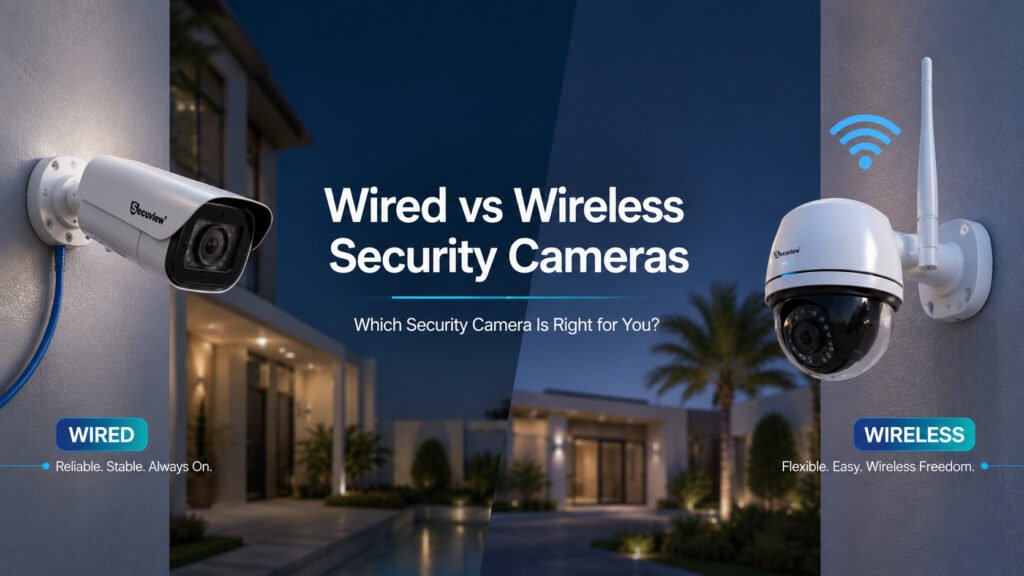
Ask ten people whether wired or wireless cameras are “better,” and most will answer with whichever one they already own. The honest answer is that neither wins outright — a wired system and a wireless one solve genuinely different problems, and the right choice depends on the property, the existing infrastructure, how reliable the connection needs to be, and how much the system is likely to grow. This guide walks through that decision properly, covering power and network requirements, installation realities, video quality, security, and where each option actually makes sense — including for Qatar’s specific mix of villa compounds, apartment towers, and commercial builds.
What Is a Wired Security Camera?
A wired security camera connects to the network through a physical cable rather than over WiFi. How it connects: most modern wired systems run on Ethernet with Power over Ethernet, so one cable per camera carries both data and power — the full mechanics of how that actually works are covered in this guide to how IP cameras work and why a PoE switch matters. Older AHD systems are also “wired,” just over coaxial cable rather than Ethernet, a genuinely different wired technology, explained in Secuview’s AHD camera guide. Power and video transmission: a PoE-based wired camera draws continuous power from the switch and streams video the entire time it’s connected, with footage typically recorded to a local NVR rather than depending on an internet connection to function at all. Where wired cameras are commonly used: homes and villas with cable routing planned into the build, offices, warehouses, and any commercial deployment where reliability and scale matter more than installation speed.
What Is a Wireless Security Camera?
A wireless security camera connects to the network over WiFi instead of a cable, though “wireless” in practice covers a few genuinely different setups. How it connects: the camera joins the local WiFi network the same way a phone does, with the distinction between local network access and internet/cloud access mattering more than people expect, covered fully in Secuview’s WiFi camera guide. WiFi, plug-in, and battery-powered variants aren’t all the same thing: a plug-in wireless camera still needs mains power, just no data cable, while a genuinely battery-powered camera needs neither; see battery-powered camera guide for that distinction in full. Cameras using cellular data instead of WiFi entirely are a related but separate case, covered in the 4G camera guide. Where wireless cameras are commonly used: apartments, homes without existing cabling, small offices, and any position where running a cable simply isn’t practical.
Wired vs Wireless Security Cameras: Key Differences
| Factor | Wired | Wireless |
|---|---|---|
| Connection | Ethernet/PoE or coaxial cable | WiFi or wireless network |
| Power | Usually continuous wired power | Battery or external power |
| Installation | More cabling required | Usually simpler |
| Reliability | Stable, wired connection | Depends on wireless signal strength |
| Video transmission | Consistent | Can be affected by interference |
| Placement | Limited by cable routing | Greater flexibility |
| Expansion | Strong for larger systems | Convenient for smaller ones |
| Maintenance | Lower ongoing maintenance | Battery maintenance where applicable |
| Best suited for | Permanent, larger installations | Flexible, smaller installations |
Power, Internet, and Network Requirements
Do wired cameras need internet?
Not to function. A wired camera records to a local NVR over the local network regardless of whether that network has internet access; internet only becomes necessary for viewing footage remotely, away from the property.
Do wireless cameras need WiFi?
Yes, at minimum to reach the local network, but WiFi and internet aren’t quite the same requirement either. A camera can often record locally over WiFi with no internet connection at all, while cloud storage and remote monitoring specifically depend on that WiFi network having a working internet connection behind it.
Can wired cameras work during an internet outage?
Yes — local recording continues uninterrupted, since the camera, the switch, and the NVR are all talking to each other over the local network, not the internet. Remote access from outside the property is what actually stops working, not the recording itself.
What happens when power fails?
A wired camera drawing continuous power from a PoE switch stops the moment that switch loses power, unless the switch itself sits behind a UPS. Battery-powered wireless cameras keep running on stored charge, which is a genuine advantage during a power cut, though the NVR and any network equipment a wired system depends on face the same UPS question either way.
Installation, Distance, and Signal
| Installation Factor | Wired | Wireless |
|---|---|---|
| Cabling | Required | Minimal to none for data |
| Installation effort | Higher | Usually lower |
| Placement flexibility | Limited by cable routing | Greater |
| Network range | Determined by cable and network design | Determined by WiFi coverage |
| Interference | Generally low | Congestion and interference possible |
| Expansion | Requires cabling and switch capacity | Requires adequate WiFi coverage |
Maximum cable distance. Standard Ethernet, PoE included, tops out around 100 meters per run without an extender — a hard, physical limit that doesn’t bend regardless of cable grade, whether Cat5e or Cat6.
What affects wireless range. Thick walls, distance from the access point, and general WiFi congestion in a busy building all degrade signal in ways a wired connection doesn’t experience. Dense apartment buildings, where dozens of routers compete on overlapping channels, are a particularly real-world version of this problem.
Improving wireless signal. Better access-point placement, closer proximity to the router, and reducing competing wireless traffic on the same channel are the practical fixes — though at a certain point, the honest answer is that a wired connection avoids the problem entirely rather than working around it.
Video Quality and Reliability
Video quality itself — resolution, bitrate, H.264 versus H.265 compression — comes down to the camera, not the connection type; a wired and wireless camera at the same resolution and compression setting produce comparable footage. What differs is reliability of delivery: a wired connection carries that video consistently regardless of what else is happening on the network, while a wireless connection shares bandwidth with every other device on the same WiFi channel, and can drop frames or degrade quality under real congestion in a way a dedicated cable run doesn’t.
Security and Privacy
Wired camera security benefits from the physical nature of the connection — someone would need actual access to the cable or the local network to intercept anything, a meaningfully higher bar than intercepting a wireless signal.
Wireless camera security depends more heavily on the WiFi network’s own security — a weak or default router password is a real vulnerability a wired camera simply doesn’t share.
Authentication, encryption, and secure communication matter on both, regardless of connection type: strong, non-default credentials, encrypted communication (HTTPS rather than unencrypted HTTP), and keeping firmware current are the baseline practices that actually determine how secure either system is in practice — the connection type is a smaller factor than how well the basics are handled.
Wired vs Wireless Security Cameras: Which Should You Choose?
Choose wired cameras if you: need reliable, continuous recording, already have or can install suitable cabling, are running multiple cameras, want long-term scalability, or are dealing with poor WiFi coverage that isn’t easily fixed.
Choose wireless cameras if you: want the simplest possible installation, have limited or no cabling options, need flexible camera placement, have genuinely reliable WiFi, or only need a small handful of cameras.
Choose a hybrid system if you: need wired reliability at critical points — a main entrance, a server room — while using wireless flexibility for lower-priority positions, are dealing with mixed installation conditions across one property, or want to expand the system gradually rather than committing fully to one approach from day one.
Wired vs Wireless by Property Type
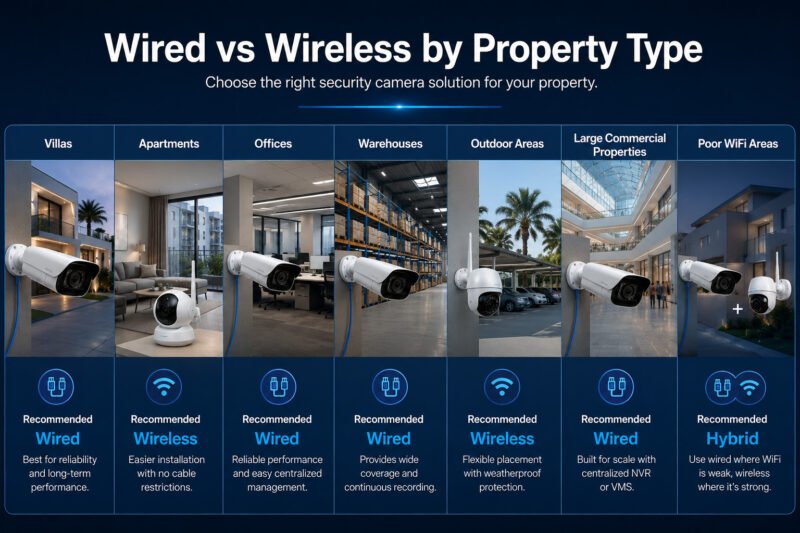
Villas in Qatar generally have the clearest path to a wired system, since cable routing can be planned into new construction or added during a renovation without the same restrictions an apartment faces, though concrete and marble finishes common in Qatar villa construction make retrofitting cable into an already-finished property genuinely more expensive than planning it.
Apartments are usually the opposite case: cable-routing restrictions are real, landlord permissions complicate any wiring work, and WiFi coverage within the unit is often already decent, which is exactly why wireless cameras dominate apartment installations, not just in Qatar but generally.
Offices benefit from wired systems as they scale past a handful of cameras, where reliability and centralized NVR management start to matter more than installation speed.
Warehouses need both real coverage distance and continuous, dependable recording across a large physical area, conditions that favor wired infrastructure, or at minimum a PoE backbone with wireless cameras filling in harder-to-reach positions.
Outdoor areas anywhere in Qatar add heat and dust into the calculation on top of the usual cable-routing and WiFi-coverage questions; weatherproof housing matters regardless of connection type, covered in full in Secuview’s outdoor camera climate guide, but a wired camera’s power reliability is less exposed to the same environmental stress a battery’s charge cycle faces in extreme heat.
Large commercial properties, malls, hotels, and multi-building compounds are almost always wired at scale, since centralized NVR or VMS management across dozens of cameras genuinely requires the reliability and structured network wired infrastructure provides.
Properties with poor WiFi coverage have a straightforward answer: either fix the coverage problem directly, or lean wired specifically to avoid depending on a wireless signal that isn’t reliable in the first place. A hybrid deployment — wired where WiFi is weakest, wireless elsewhere — is often the practical middle ground rather than an all-or-nothing choice.
Planning for future expansion, wherever the property is, means thinking beyond the current camera count: does the network switch have spare PoE ports, is there WiFi capacity for more wireless devices, and does the NVR’s storage and channel count leave room to grow — the same planning questions covered in more depth in Secuview’s guide to NVR systems.
Frequently Asked Questions
What is better, wired or wireless security cameras?
Neither is universally better. Wired cameras generally suit reliability and larger installations, while wireless cameras offer greater flexibility and simpler installation. The right choice depends on the property, infrastructure, coverage requirements, and installation constraints.
What are the disadvantages of wired security cameras?
Wired security cameras typically require more installation effort, cable routing can limit camera placement, and the upfront installation cost can be higher than a wireless setup.
What are the disadvantages of wireless CCTV cameras?
Wireless CCTV cameras can depend on WiFi signal strength and may be affected by interference or network congestion. Battery-powered wireless models also require periodic charging or battery maintenance.
What is the downside to WiFi security cameras?
The main downside is that reliability depends on wireless signal quality. Walls, distance from the router, interference, and network congestion can affect the connection in ways that a wired camera generally does not experience.
Are wireless cameras reliable enough for home security?
Yes. Wireless cameras can be reliable for most homes when there is good WiFi coverage. Reliability can become a concern when the camera is located in an area with weak signal strength or heavy network congestion.
Do wired cameras provide better image quality than wireless cameras?
Not inherently. Image quality is primarily determined by the camera, sensor, lens, resolution, and settings rather than whether the camera is wired or wireless. Wired connections provide more consistent video transmission without wireless interference.
Can wired and wireless cameras work together?
Yes. A hybrid security system can combine wired and wireless cameras. This is a practical approach when some camera locations have easy access to network cabling while others are difficult or expensive to wire.
How often do wireless camera batteries need replacing?
Battery life depends heavily on the camera model, battery capacity, motion activity, recording frequency, live viewing, and other usage conditions. Rechargeable wireless cameras generally need periodic charging rather than regular battery replacement.
What is the best security camera for poor WiFi?
A wired security camera is generally the better choice when WiFi coverage is poor because it does not depend on wireless signal strength. Where cabling is practical, a wired connection is often a more direct solution than trying to improve WiFi coverage around the camera location.
Is a wired or wireless camera better for outdoor security?
Wired cameras generally provide more consistent connectivity outdoors, although weatherproof wireless cameras can also work well. The best choice depends mainly on whether cabling can be installed easily and whether reliable WiFi coverage is available at the camera’s intended position.
Is a wired or wireless camera better for a large business?
Wired cameras are generally the better choice for large businesses because centralized recording, reliable network connectivity, and scalable infrastructure become increasingly important as the number of cameras grows.
Do wired cameras need internet to record video?
No. Wired IP cameras can record locally to an NVR over the local network without internet access. Internet connectivity is only required for features such as remote viewing from outside the property.
Conclusion
There’s no universal winner here, and treating this as a search for one is the wrong frame. Wired means reliability, continuous recording, and room to scale. Wireless means flexibility and a genuinely simpler install. A hybrid system means getting both, where the property actually calls for it. According to Security.org’s home security industry guide, remote access and reliable monitoring have become baseline expectations regardless of which connection type a system uses, which means the real decision isn’t about features at all, but about property, existing infrastructure, connectivity, power, recording needs, and how much the system is likely to grow.













