

Regular maintenance helps outdoor CCTV cameras perform reliably in Qatar’s heat, dust, and humidity.
Outdoor CCTV Camera Maintenance in Qatar: Heat, Dust, and Humidity
Outdoor CCTV cameras in Qatar face conditions that can reduce image quality and affect long-term performance. Heat, direct sunlight, dust, sand, humidity, and moisture can build up around the camera, lens, housing, cables, and connectors.
Regular maintenance helps keep the security camera, recording system, and video surveillance system working as expected.
Why Outdoor CCTV Camera Maintenance Matters
A clean camera lens gives the image sensor a clearer view. Dust or water marks can make footage look hazy, while dirt around the lens can affect infrared night vision.
Maintenance also helps you find loose mounts, damaged cables, moisture, corrosion, and recording problems before they become bigger faults.
How Often Should You Maintain an Outdoor CCTV Camera?
There is no single schedule for every property. A camera beside a dusty road or construction area may need more attention than one installed under a protected villa eave.
Check outdoor cameras regularly and clean them when dust, dirt, sand, or water marks become visible. After periods of heavy dust or unusual weather, inspect the equipment again.
How to Maintain an Outdoor CCTV Camera: Step by Step
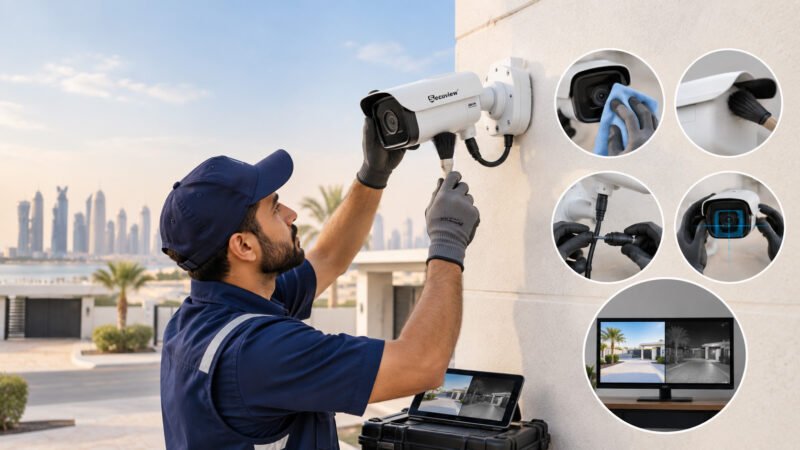
Outdoor CCTV Camera Maintenance Step by Step
1. Inspect the Camera Before Cleaning
Look at the camera housing, lens, mounting bracket, cable entry, and connectors. Check for cracks, loose fittings, moisture, corrosion, insects, or other debris.
2. Safely Isolate the Camera
Before physical maintenance, safely disconnect or isolate the camera from its power source where appropriate. This is especially important when checking cables, connectors, or PoE equipment.
3. Remove Dust, Sand, and Cobwebs
Remove loose dust and debris first. A soft brush or suitable air cleaning method can help clear the outside of the camera without rubbing particles across the lens.
4. Clean the Camera Lens
Use a clean microfiber cloth suitable for optical surfaces. Gently wipe the lens after removing loose particles. Avoid abrasive materials and unsuitable chemicals that could damage the optical surface.
After cleaning, check the live video. The image should be clear without obvious haze, marks, or glare.
5. Clean the Camera Housing
Wipe the outside of the housing carefully. Check that dust has not collected around openings, seals, or cable entry points.
Do not damage the camera’s protective seals while cleaning.
6. Check Cables and Connectors
Inspect Ethernet cables, electrical connections, and connectors for wear, moisture, loose connections, or corrosion. A damaged connection can cause unstable video or make an IP camera go offline.
7. Check the Camera Position
Make sure the camera has not moved because of vibration, wind, or a loose mounting bracket. Confirm that the lens still covers the intended area.
8. Test Daytime Image Quality
Check the live image for blur, glare, poor exposure, obstructions, and changes in the field of view.
9. Test Night Vision
Check the camera after dark. Look for weak infrared performance, bright reflections, dark areas, or insects and dust close to the lens.
10. Check Recording and Connectivity
Confirm that the camera stays connected and that video is being recorded correctly to the NVR or DVR. Review recent footage and check for missing recordings or storage errors.
How Qatar Weather Affects Outdoor CCTV Cameras
Heat and Direct Sunlight
High outdoor temperatures and direct sunlight can place extra stress on electronic equipment. Camera placement and suitable weather protection matter, especially on exposed walls and rooftops.
Dust and Sand
Dust can collect on the lens and housing. Fine particles may reduce image clarity and affect night-time viewing when infrared light reflects from the dirty surface.
Humidity and Moisture
Humidity can contribute to condensation and moisture problems. Inspect the housing, cable connections, and entry points for signs of water ingress.
Water and Corrosion
Outdoor connectors and exposed metal parts should be checked for corrosion or water damage. Proper weather protection helps reduce these risks.
Outdoor CCTV Maintenance Checklist
| Check | Look for |
|---|---|
| Lens | Dust, dirt, water marks |
| Housing | Damage, moisture, debris |
| Mount | Loose or changed position |
| Cables | Wear or damage |
| Connectors | Moisture or corrosion |
| Image | Blur, glare, obstruction |
| Night vision | IR reflection or dark areas |
| Recording | Missing footage |
| NVR/DVR | Connection and storage issues |
| Power | Stable operation |
Expert Advice From a CCTV Installation Engineer
An ELV engineer at Starfox Security System can assess the camera from an installation and maintenance point of view. The practical checks should include lens condition, camera alignment, cable connections, power, night vision, recording, and signs of moisture.
For Qatar properties, regular inspection is especially useful where cameras are exposed to dust, heat, direct sunlight, or humid conditions.
When Should You Call a CCTV Installation Engineer?
Professional service is appropriate when a camera repeatedly goes offline, shows water inside the housing, loses night vision, stops recording, has damaged wiring, or continues to produce poor images after cleaning.
FAQs
How often should outdoor CCTV cameras be cleaned?
Clean them when dust, dirt, sand, or water marks affect the lens or housing, and inspect them regularly based on the property’s outdoor conditions.
Does Qatar heat affect outdoor CCTV cameras?
Yes. Prolonged heat and direct sunlight can place additional stress on outdoor electronic equipment, so camera condition and installation environment should be checked.
Can dust make CCTV footage blurry?
Yes. Dust and dirt on the lens can reduce image clarity and can also cause unwanted infrared reflections at night.
How do you clean a CCTV camera lens?
Remove loose particles first, then gently clean the lens with a clean microfiber cloth designed for optical surfaces.
Can humidity damage an outdoor CCTV camera?
Humidity can contribute to condensation and moisture problems. Check the camera housing and cable connections for signs of water ingress.
When does a CCTV camera need professional maintenance?
Call a CCTV installation engineer when cleaning does not solve the problem or when you find wiring faults, water damage, repeated connection loss, recording failures, or persistent image problems.
Conclusion
Outdoor CCTV maintenance in Qatar is mainly about keeping the lens, housing, connections, camera position, image, night vision, power, and recording system in good condition. Regular checks can help identify dust, moisture, loose fittings, cable faults, and recording problems before they interrupt surveillance.













